Druid MCP Server
A comprehensive Model Context Protocol (MCP) server for Apache Druid that provides extensive tools, resources, and prompts for managing and analyzing Druid clusters.
Developed by iunera - Advanced AI and Data Analytics Solutions
Overview
This MCP server implements a intend-based architecture where profiles picture their usaae intend and the corresponding area of Druid usage. The server provides three main types of MCP components:
- Tools - Executable functions for performing operations
- Resources - Data providers for accessing information
- Prompts - AI-assisted guidance templates
Video Walkthrough
Learn how to integrate AI agents with Apache Druid using the MCP server. This tutorial demonstrates time series data exploration, statistical analysis, and data ingestion using natural language with AI assistants like Claude, ChatGPT, and Gemini.

Click the thumbnail above to watch the video on YouTube
🌊 Y̊pipe: AI-Powered UI for Druid
Experience your data like never before with Y̊pipe (formerly Data-Philter), a local desktop application that makes offline AI practical, designed by iunera. It leverages this Druid MCP Server to provide a seamless, conversational interface for your Druid cluster.
- Natural Language Queries: Ask questions in plain English and get results instantly.
- Local & Secure: Runs completely locally with support for offline models (CPU/GPU).
- Plug & Play: Works out-of-the-box with the Development Druid Installation.

The easiest way to test iunera/druid-mcp-server is ypipe.com / https://github.com/iunera/ypipe
📋 Ypipe Integration Blueprint
For seamless integration, we provide a predefined Ypipe integration blueprint file:
- Blueprint File: druid.ypipe
- Configuration Guide: Ypipe Example Documentation
This blueprint allows you to easily connect and configure the Druid MCP server in Ypipe through a visual workspace.
| Ypipe Workspace Flow | Druid Node Configuration |
|---|---|
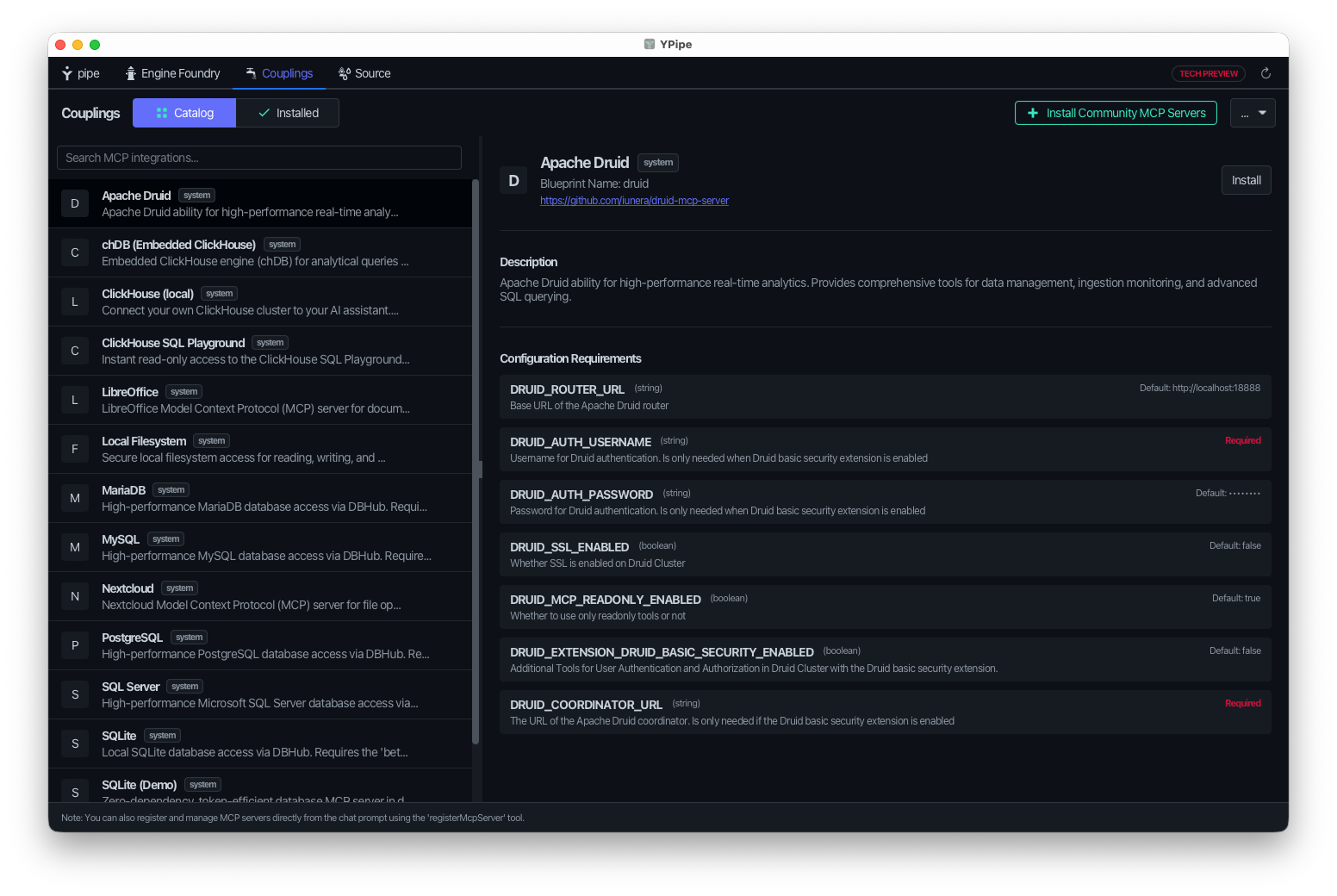 | 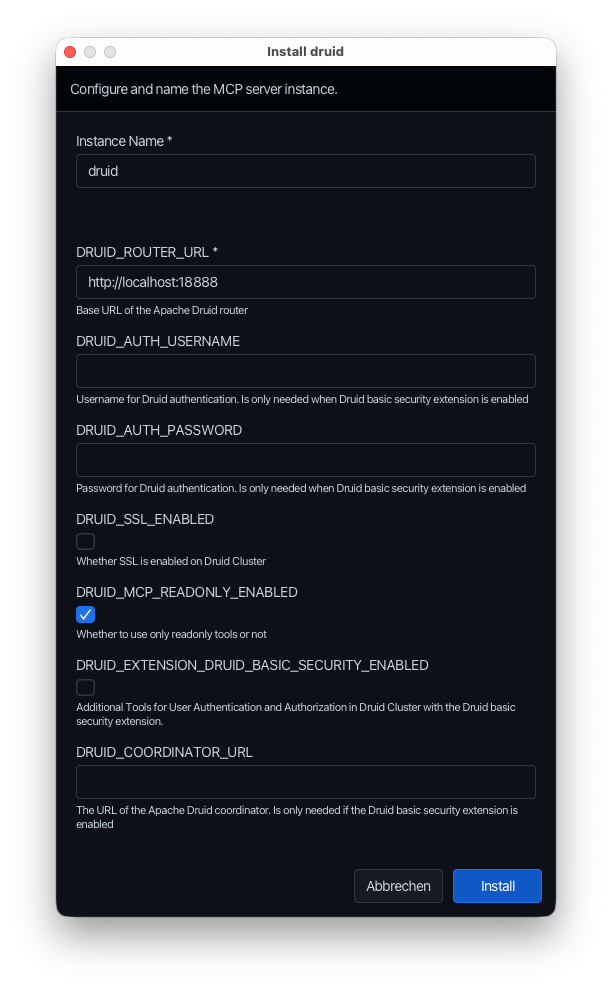 |
Features
- Pure Java
- Spring AI MCP Server integration
- Tool-based architecture for MCP protocol compliance
- Tool-based Architecture: Complete MCP protocol compliance with automatic JSON schema generation
- Multiple Transport Modes: STDIO, SSE, and Streamable HTTP support including Oauth
- Real-time Communication: Server-Sent Events with streaming capabilities
- Comprehensive error handling
- Customizable Prompt Templates: AI-assisted guidance with template customization
- Comprehensive Error Handling: Graceful error handling with meaningful responses
- Enterprise Ready: Production-grade configuration and security features
MCP Inspector Interface
When connected to an MCP client, you can inspect the available tools, resources, and prompts through the MCP inspector interface:
Available Tools
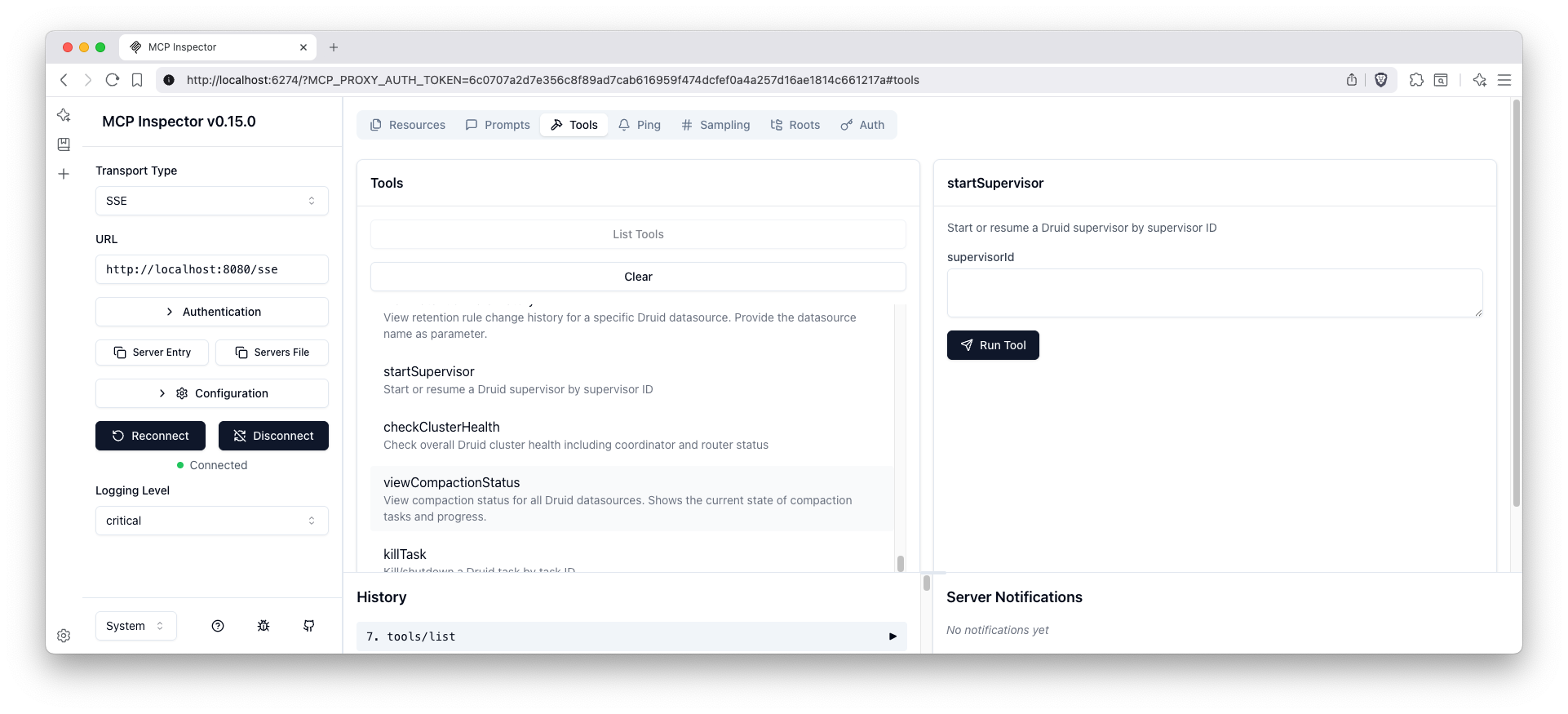
The tools interface shows all available Druid management functions organized by feature areas including data management, ingestion management, and monitoring & health.
Available Resources
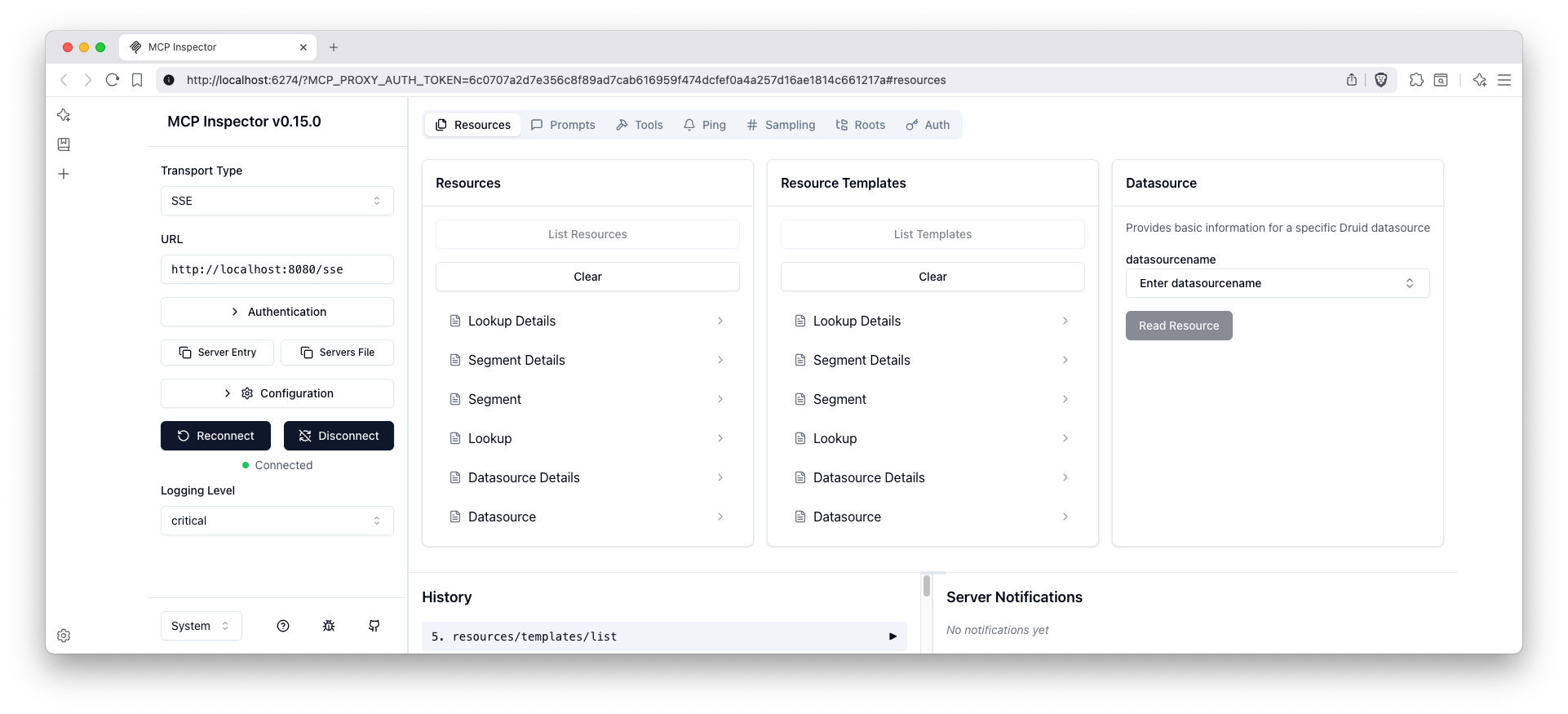
The resources interface displays all accessible Druid data sources and metadata that can be retrieved through the MCP protocol.
Available Prompts
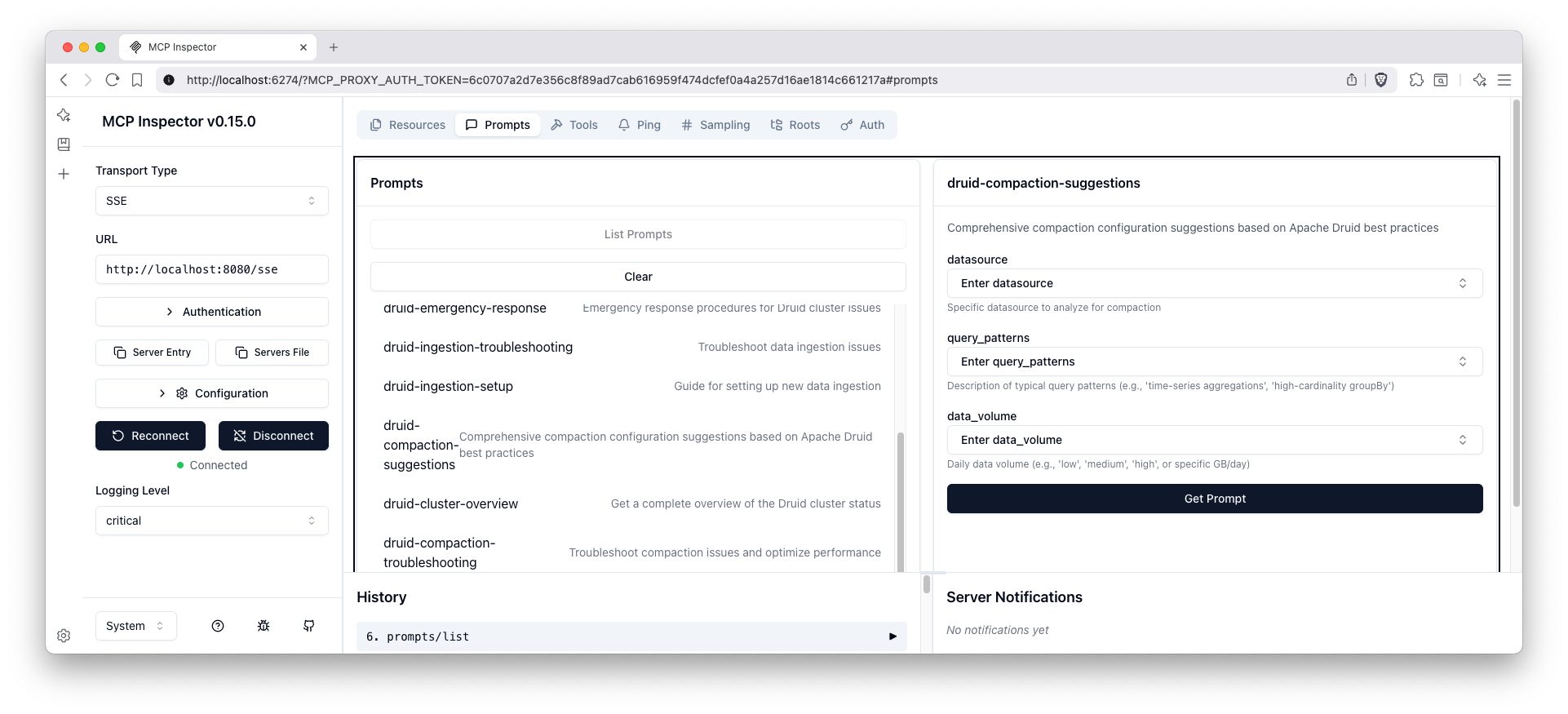
The prompts interface shows all AI-assisted guidance templates available for various Druid management tasks and data analysis workflows.
Quick Start
MCP Configuration for LLMs
A ready-to-use MCP configuration file is provided at mcp-servers-config.json that can be used with LLM clients to connect to this Druid MCP server.
Examples
The configuration includes multiple integration and transport options:
- STDIO (default): see examples/stdio/README.md - server is spawned by the MCP client over STDIO.
- Streamable HTTP (profile: http): see examples/streamable-http/README.md - single /mcp endpoint per MCP 2025-06-18.
- Ypipe Blueprint: see examples/ypipe/README.md - configure and run the Druid MCP Server inside the Ypipe desktop client using the druid.ypipe blueprint.
Docker examples using environment variables:
# STDIO mode (default)
docker run --rm -i \
  -e DRUID_ROUTER_URL=http://your-druid-router:8888 \
  -e DRUID_COORDINATOR_URL=http://your-druid-coordinator:8081 \
  iunera/druid-mcp-server:latest

# HTTP mode (enable profile 'http' and expose /mcp)
docker run -p 8080:8080 \
  -e SPRING_PROFILES_ACTIVE=http,query \
  -e DRUID_ROUTER_URL=http://your-druid-router:8888 \
  -e DRUID_COORDINATOR_URL=http://your-druid-coordinator:8081 \
iunera/druid-mcp-server:latestNote on Spring profiles:
- Default profile: stdio,query
- HTTP profile: set SPRING_PROFILES_ACTIVE=http,query to enable Streamable HTTP at /mcp
Prerequisites
- Java 25
- Maven 3.6+
- Apache Druid cluster running with router on port 8888
Build and Run
# Build the application
mvn clean package -DskipTests

# Run the application
java -jar target/druid-mcp-server-2.0.0.jarThe server will start on port 8080 by default.
For detailed build instructions, testing, Docker setup, and development guidelines, see development.md.
Security & Authentication
- Streamable HTTP and SSE transports are secured with OAuth 2.0 by default.
- Clients must send a valid Bearer token in the Authorization header when connecting.
- Example: Authorization: Bearer YOUR_JWT_TOKEN
Environment Variables
DRUID_MCP_SECURITY_OAUTH2_ENABLED:- Description: Enables or disables OAuth2 security for client authentication.
- Type: Boolean
- Default:
true(OAuth2 is enabled by default as per the text above) - Usage: Set to
falseto disable OAuth2 authentication. When disabled, clients can access the server without providing OAuth2 tokens.
- For enterprise SSO integration (OpenID Connect, Azure AD, Keycloak, etc.), please send an inquiry to consulting@iunera.com and see Contact & Support.
Installation from Maven Central
If you prefer to use the pre-built JAR without building from source, you can download and run it directly from Maven Central.
Prerequisites
- Java 25 JRE only
Download and Run
Download the JAR from Maven Central https://repo.maven.apache.org/maven2/com/iunera/druid-mcp-server/
# STDIO mode (default)
java -jar target/druid-mcp-server-2.0.0.jar

# HTTP mode (profile: http) - exposes /mcp on port 8080
java -Dspring.profiles.active=http \
-jar target/druid-mcp-server-2.0.0.jarFor Developers
For detailed development information including build instructions, testing guidelines, architecture details, and contributing guidelines, see development.md.
Available Tools by Feature
The MCP server activates tools dynamically based on active Spring profiles (SPRING_PROFILES_ACTIVE). The default configuration runs the server in STDIO mode with the query profile enabled.
Profile: query (Default Active Profile)
Provides safe, read-only data querying and browsing capabilities.
| Tool | Description | Parameters | Druid API Endpoint / Functionality |
|---|---|---|---|
getDatasources | List all available Apache Druid datasources or get detailed schema for a specific datasource. | datasourceName (String, optional), detailed (Boolean, optional) | /druid/v2/sql (queries system catalogs like INFORMATION_SCHEMA.TABLES & COLUMNS) |
getLookups | Get configuration or status of lookups for all or a specific tier. | tier (String, optional), lookupName (String, optional), includeStatus (Boolean, optional) | /druid/coordinator/v1/lookups/config & /status endpoints |
getSegments | Fetch segments metadata or details for a specific segment. | datasource (String, optional), segmentId (String, optional), detailed (Boolean, optional), metadataOnly (Boolean, optional) | /druid/coordinator/v1/datasources/{ds}/segments & system tables (sys.segments via /druid/v2/sql) |
getSegmentLoadQueue | Get the load queue status showing segments currently being loaded. | serverName (String, optional) | /druid/coordinator/v1/loadqueue |
queryDruidSql | Execute a SQL query against Druid datasources. | sqlQuery (String, required) | /druid/v2/sql (Router / Broker SQL endpoint) |
Profile: ops
Provides administrative control over ingestion specs, tasks, streaming supervisors, retention rules, and compaction.
| Tool | Description | Parameters | Druid API Endpoint / Functionality |
|---|---|---|---|
getCompactionConfig | View compaction configuration or configuration change history for datasources. | datasource (String, optional), includeHistory (Boolean, optional) | /druid/coordinator/v1/config/compaction endpoints |
getCompactionStatus | Retrieve the current status of compaction runs and progress. | datasource (String, optional) | /druid/coordinator/v1/compaction/status |
manageCompaction | Add, update, or remove a compaction configuration. | action (Enum: UPSERT, DELETE, required), datasource (String, required), configJson (String, optional) | /druid/coordinator/v1/config/compaction (POST/DELETE) |
manageDatasourceOrSegment | Modify segment states or permanently drop a datasource. | action (Enum: ENABLE_SEGMENT, DISABLE_SEGMENT, KILL_DATASOURCE, required), datasource (String, required), segmentId (String, optional), interval (String, optional) | /druid/coordinator/v1/datasources & segment POST/DELETE |
manageLookup | Create, update, or delete a lookup configuration. | action (Enum: UPSERT, DELETE, required), tier (String, required), lookupName (String, required), configJson (String, optional) | /druid/coordinator/v1/lookups/config (POST/DELETE) |
queryDruidMultiStage | Execute a multi-stage SQL query (MSQ) against Druid datasources as a task. | sqlQuery (String, required) | /druid/v2/sql/task (MSQ execution endpoint) |
queryDruidMultiStageWithContext | Execute a multi-stage SQL query with custom context parameters. | sqlQuery (String, required), contextJson (String, optional) | /druid/v2/sql/task with context configurations |
getMultiStageQueryTaskStatus | Get the status of a multi-stage query task. | taskId (String, required) | /druid/indexer/v1/task/{taskId}/status |
cancelMultiStageQueryTask | Cancel a running multi-stage query task. | taskId (String, required) | /druid/indexer/v1/task/{taskId}/shutdown (POST) |
getRetentionRules | Retrieve retention rules or audit history for a specific datasource or all datasources. | datasource (String, optional), includeHistory (Boolean, optional) | `/druid/co |
…