<img src="assets/reddit-mcp-buddy-icon-white-background.png" width="48" align="center"/> Reddit MCP Buddy
Reddit Browser for Claude Desktop and AI Assistants
A Model Context Protocol (MCP) server that enables Claude Desktop and other AI assistants to browse Reddit, search posts, and analyze user activity. Clean, fast, and actually works - browse subreddits with no API keys; add free Reddit credentials for search, comments, user analysis, and full metrics.




🎬 See It In Action
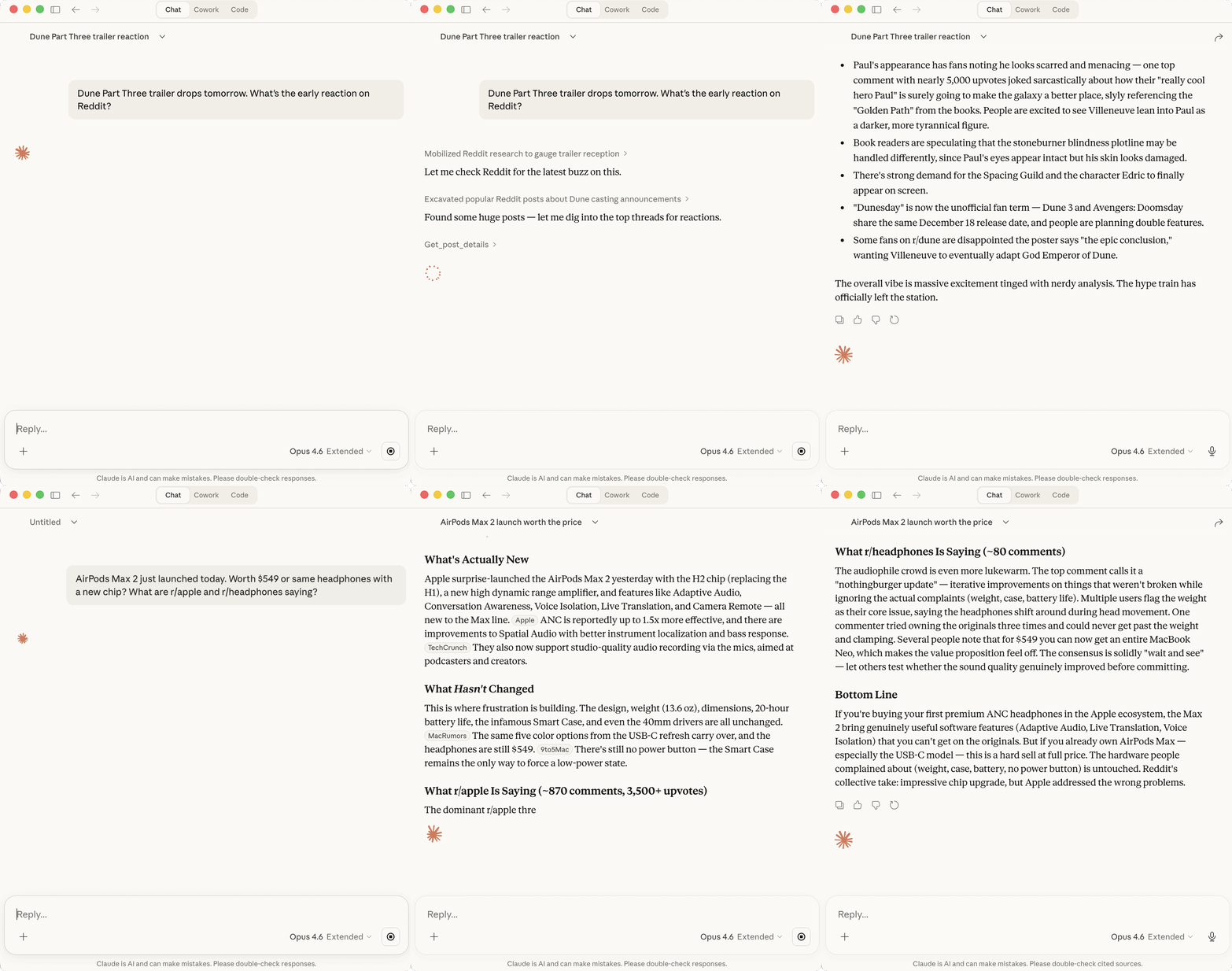
Claude checking Reddit's reaction to the Dune Part Three trailer and whether the AirPods Max 2 are worth $549
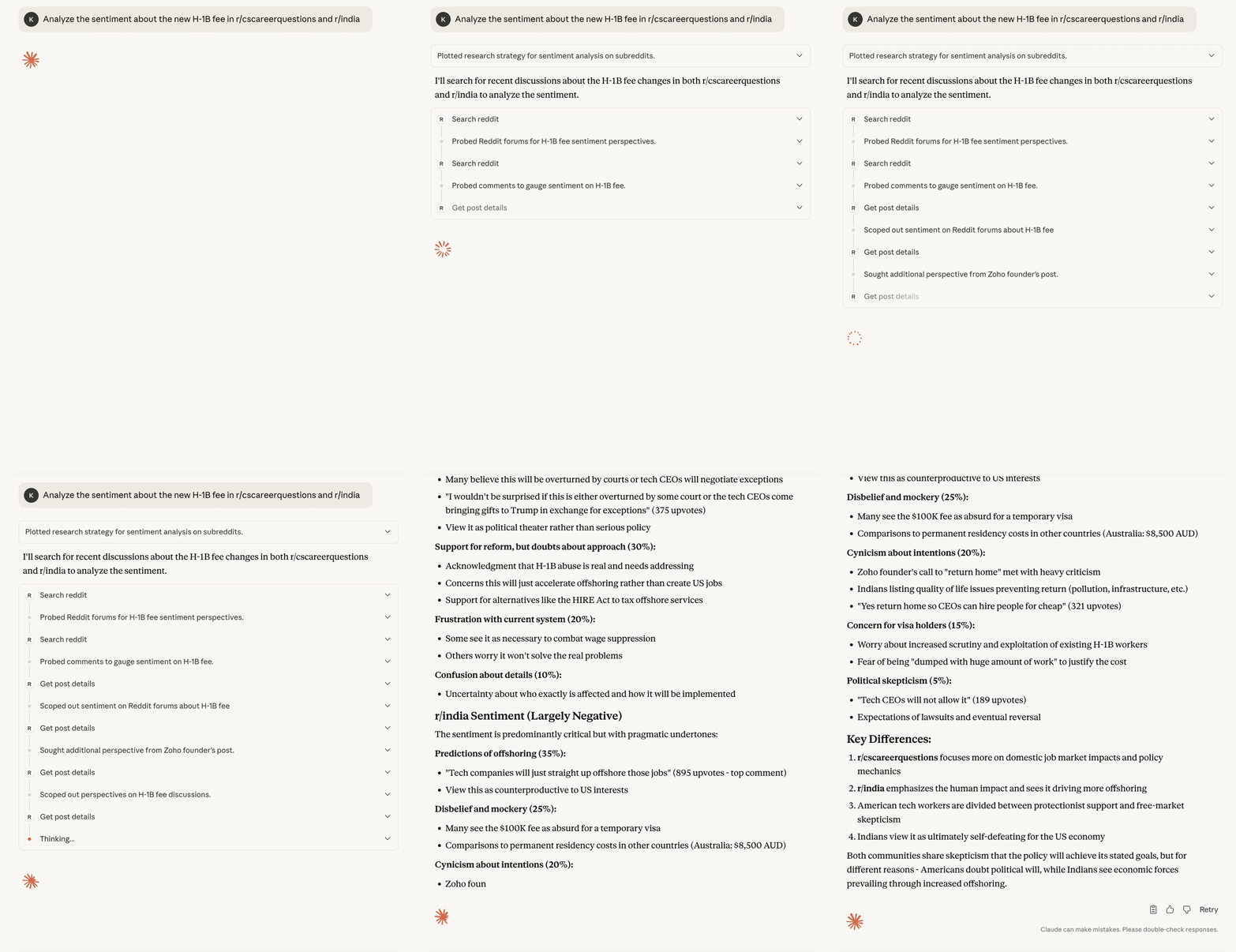
Claude analyzing real-time sentiment about H-1B visa changes across r/cscareerquestions and r/india
Table of Contents
- What makes Reddit MCP Buddy different?
- Quick Start
- What can it do?
- Available Tools
- Authentication
- Installation Options
- Comparison with Other Tools
- Troubleshooting
- Development
- Support
- Related Resources
What makes Reddit MCP Buddy different?
- 🚀 Zero setup - Browse subreddits instantly, no Reddit API registration needed (search, comments, user analysis, and engagement metrics need free credentials)
- ⚡ Up to 10x more requests - Three-tier authentication system (10/60/100 requests per minute)
- 🎯 Clean data - No fake "sentiment analysis" or made-up metrics
- 🧠 LLM-optimized - Built specifically for AI assistants like Claude
- 📦 TypeScript - Fully typed, reliable, and maintainable
- ✅ Proven rate limits - Thoroughly tested authentication tiers with verification tools
Quick Start (30 seconds)
For Claude Desktop - Desktop Extension (Easiest!)
- Download: reddit-mcp-buddy.mcpb
- Install: Open the downloaded file
- Done! Reddit tools are now available in Claude
For Claude Desktop - NPM Method (Alternative)
Add this to your claude_desktop_config.json:
{
  "mcpServers": {
    "reddit": {
      "command": "npx",
      "args": ["-y", "reddit-mcp-buddy"]
    }
  }
}For Claude Code
Run this command to add the MCP server (user scope):
claude mcp add --transport stdio reddit-mcp-buddy -s user -- npx -y reddit-mcp-buddyFor Other MCP Clients
Use the NPM method: npx -y reddit-mcp-buddy
What can it do?
Ask your AI assistant to:
- 📊 "What's trending on Reddit?" - Browse hot posts from r/all
- 🔍 "Search for discussions about AI" - Search across all subreddits
- 💬 "Get comments from this Reddit post" - Fetch post with full comment threads
- 👤 "Analyze user spez" - Get user history, karma, and activity
- 📚 "Explain Reddit karma" - Understand Reddit terminology
Available Tools
browse_subreddit
Browse posts from any subreddit with sorting options.
- Subreddit:
  - "all" - entire Reddit frontpage
  - "popular" - trending across Reddit
  - Any specific subreddit (e.g., "technology", "programming", "science")
- Sort by: hot, new, top, rising, controversial
- Time range: hour, day, week, month, year, all (for top/controversial sort)
- Include subreddit info: Optional flag for subreddit metadata (requires credentials)No credentials? Results are served from Reddit's public RSS feed (
data_source: "rss"):score,num_comments,upvote_ratio, andnsfwcome backnull, and theinclude_nsfwfilter can't be applied. Add credentials (Authentication) for full data via the API.
search_reddit
Search across Reddit or specific subreddits.
- Query: Your search terms
- Filter by: subreddit, author, time, flair
- Sort by: relevance, hot, top, new, commentsget_post_details
Get a post with all its comments.
- Input:
  - Reddit URL (supports multiple formats), OR
  - Post ID alone (will auto-detect subreddit, 2 API calls), OR
  - Post ID + subreddit (most efficient, 1 API call)
- Supported URL formats:
  - reddit.com, www.reddit.com
  - old.reddit.com, new.reddit.com
  - np.reddit.com (No Participation links)
  - m.reddit.com (mobile links)
  - redd.it short URLs
  - URLs with query params (?utm_source=...) or fragments (#comment)
- Options: comment sorting, depth, link extractionuser_analysis
Analyze a Reddit user's profile.
- Username: Any Reddit user
- Returns: karma, posts, comments, active subredditsreddit_explain
Get explanations of Reddit terms.
- Terms: karma, cake day, AMA, ELI5, etc.Authentication (Optional)
Want more requests? Add Reddit credentials to your Claude Desktop config:
Setup Steps
- Go to https://www.reddit.com/prefs/apps
- Click "Create App" or "Create Another App"
- Fill out the form:
- Name: Any name (e.g., "reddit-mcp-buddy")
- App type: Select "script" (CRITICAL for 100 rpm!)
- Description: Optional
- About URL: Leave blank
- Redirect URI:
http://localhost:8080(required but unused)
- Click "Create app"
- Find your credentials:
- Client ID: The string under "personal use script"
- Client Secret: The secret string
- Update your Claude Desktop config:
{
  "mcpServers": {
    "reddit": {
      "command": "npx",
      "args": ["-y", "reddit-mcp-buddy"],
      "env": {
        "REDDIT_CLIENT_ID": "your_client_id",
        "REDDIT_CLIENT_SECRET": "your_client_secret",
        "REDDIT_USERNAME": "your_username",
        "REDDIT_PASSWORD": "your_password"
      }
    }
  }
}Three-Tier Authentication System
Reddit MCP Buddy supports three authentication levels, each with different rate limits:
| Mode | Rate Limit | Required Credentials | Best For |
|---|---|---|---|
| Anonymous | 10 req/min* | None | Testing, light usage |
| App-Only | 60 req/min | Client ID + Secret | Regular browsing |
| Authenticated | 100 req/min | All 4 credentials | Heavy usage, automation |
*Server-side cap. Anonymous requests are served from Reddit's logged-out RSS feed, which applies its own stricter per-IP throttle (often one uncached request per 25-60 seconds). The 15-minute cache and automatic retries absorb much of this, but sustained anonymous browsing is effectively slower than 10 req/min.
How It Works:
- Anonymous Mode: Default mode, no setup required. Only
browse_subreddit(plus the offlinereddit_explain) works: Reddit blocks the logged-out JSON API, so browse results come from Reddit's public RSS feed (data_source: "rss") with engagement metrics and NSFW flags asnull. The remaining tools require credentials. - App-Only Mode: Uses OAuth2 client credentials grant (works with both script and web apps)
- Authenticated Mode: Uses OAuth2 password grant (requires script app type)
Important Notes:
- Script apps support BOTH app-only (60 rpm) and authenticated (100 rpm) modes
- Web apps only support app-only mode (60 rpm maximum)
- For 100 requests/minute, you MUST use a script app with username + password
Privacy & Data Handling
Reddit MCP Buddy is designed with privacy and transparency in mind. Here's how your data is handled:
Data Collection
- Reddit API Data: The server fetches public Reddit content (posts, comments, user profiles) through Reddit's official API
- No Tracking: We don't collect, store, or transmit any analytics, telemetry, or usage data
- No Third Parties: All data flows directly between your machine, Reddit's API, and your AI assistant
Local Storage
- Authentication Credentials (optional):
- Stored locally in
~/.reddit-mcp-buddy/auth.jsonwhen using--authCLI setup - Passwords are never written to disk - only used in-memory for OAuth token exchange
- Environment variables (recommended for Claude Desktop) are never persisted by this server
- Stored locally in
- Cache Data:
- Reddit API responses are temporarily cached in memory to improve performance
- Cache size limited to 50MB maximum
- All cache data is cleared when the server stops
- Can be disabled with
REDDIT_BUDDY_NO_CACHE=true
Data Transmission
- Reddit API Only: Your credentials are only sent to Reddit's official OAuth endpoints (
https://oauth.reddit.comandhttps://www.reddit.com) - No External Services: No data is sent to any other external services, analytics platforms, or third parties
- Local Processing: All data processing happens locally on your machine
Security Notes
- Read-Only Operations: All tools are read-only - the server never posts, comments, or modifies any Reddit content
- Credential Safety:
- OAuth tokens are refreshed automatically and kept in memory; only
--authCLI setups also cache the token in~/.reddit-mcp-buddy/auth.json(file mode 600) - Client secrets are treated as sensitive and never logged
- Use environment variables in Claude Desktop config for maximum security
- OAuth tokens are refreshed automatically and kept in memory; only
- Open Source: Full source code is available at https://github.com/karanb192/reddit-mcp-buddy for security auditing
GDPR & Privacy Compliance
- No Personal Data Collection: We don't collect or process any personal data beyond what's necessary to authenticate with Reddit's API
- User Control: You control all credentials and can delete
~/.reddit-mcp-buddy/auth.jsonat any time - Right to Erasure: Simply delete the auth file or uninstall the server to remove all local data
Questions or Concerns?
If you have any privacy questions or concerns, please open an issue on GitHub.
Testing & Development
Testing Your Rate Limits
Reddit MCP Buddy includes comprehensive testing tools to verify your authentication is working correctly:
# Clone the repository first
git clone https://github.com/karanb192/reddit-mcp-buddy.git
cd reddit-mcp-buddy
npm install

# Test with your current environment settings
npm run test:rate-limit

# Test specific authentication modes
npm run test:rate-limit:anon    # Test anonymous mode (10 rpm)
npm run test:rate-limit:app     # Test app-only mode (60 rpm)
npm run test:rate-limit:auth # Test authenticated mode (100 rpm)The rate limit tester will:
- Start a local server instance
- Make rapid API requests to test rate limits
- Display a real-time progress bar
- Confirm which authentication tier you're using
- Show exactly when rate limiting kicks in
Interactive Authentication Setup (for local testing only)
For local development and testing, you can set up authentication interactively:
npx -y reddit-mcp-buddy --authThis will prompt you for Reddit app credentials and save them locally. Note: This does NOT work with Claude Desktop - use environment variables in you
…