hypermnesic



One brain. Every AI. Yours.
Your second brain lives as plain Markdown in a Git repo you host. ChatGPT, Claude, and your coding agents — on your laptop and your phone — all read and write that same brain through one endpoint. Obsidian is how you browse it.
Here's the part that matters: because every AI keeps curating the same notes, your memory doesn't just persist — it compounds. Every fact captured, every correction, every link added makes the next answer from every assistant sharper. Per-app memory traps you in silos; one shared brain gets smarter each day — and it's plain files you own, not rows in a vendor's database.

Every memory is a real Git commit — reviewable, revertible, yours. The search index is a disposable projection of your files; delete it and rebuild it any time. A reindex can never lose a memory.
Who it's for: developers and power note-takers who want durable agent memory they own — plain files in their own Git history, reachable by every assistant, with no vendor lock-in.
Status: public v0.1.0 release. The engine is licensed under AGPL-3.0-only; the companion plugin ships from the separate GPL-3.0
hypermnesic-companionrepository.
Why it compounds
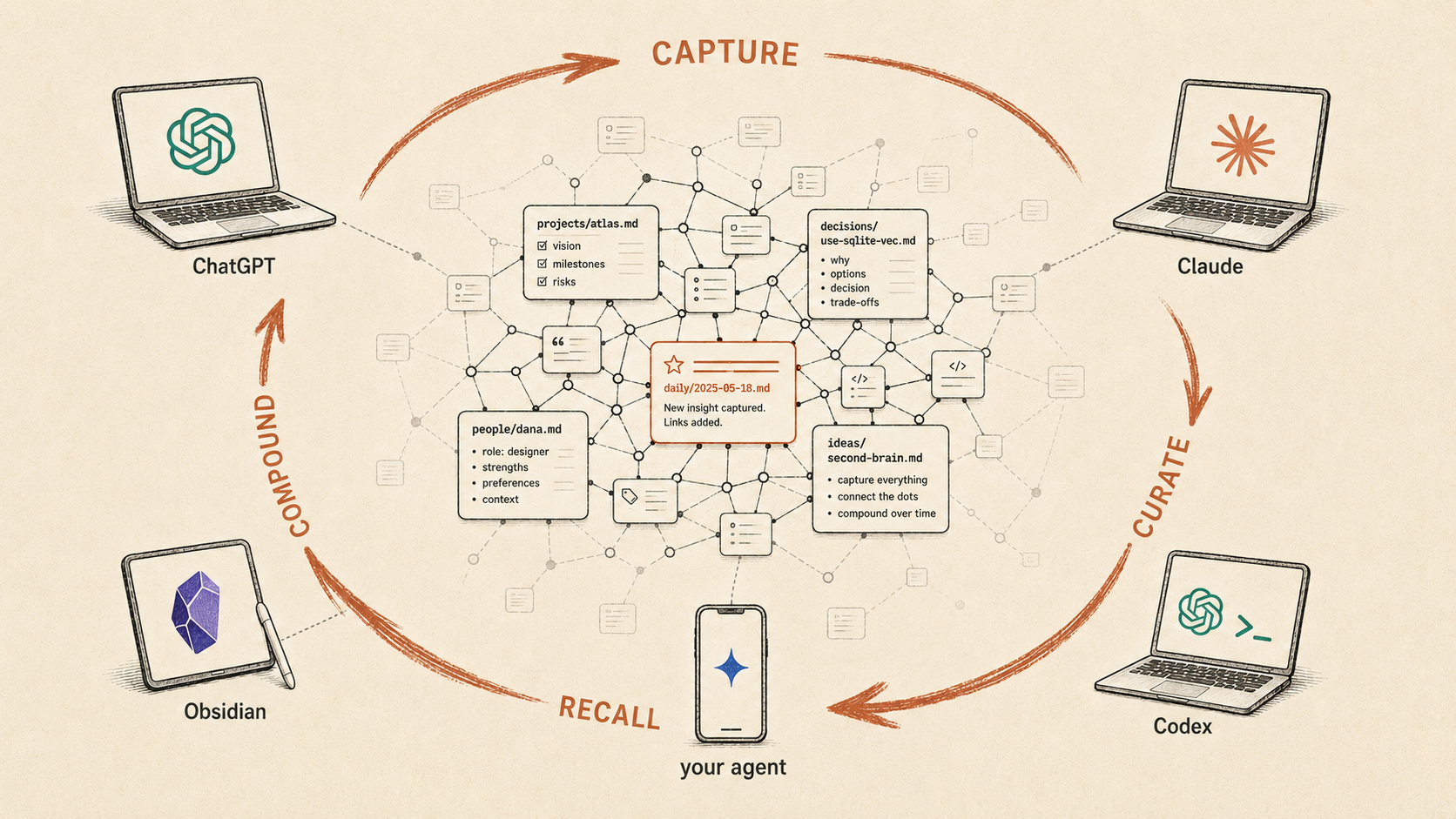
Per-app memory fragments: what you told ChatGPT is invisible to Claude, your phone's assistant forgets what your laptop's agent learned, and none of it is yours to move. A shared brain does the opposite — it turns every interaction into a flywheel:
- Capture — any AI writes a note: a decision, a fact, a person, a meeting.
- Curate — any AI links it, corrects it, or adds context the next time it's relevant.
- Recall — every other AI retrieves it on the next question.
- Compound — the brain grows denser and more useful with every turn, for all of them.
Because every write is a reviewable Git commit, one assistant's curation is safe, visible, and revertible for all the others. The brain is shared and trustworthy.
One endpoint, every client
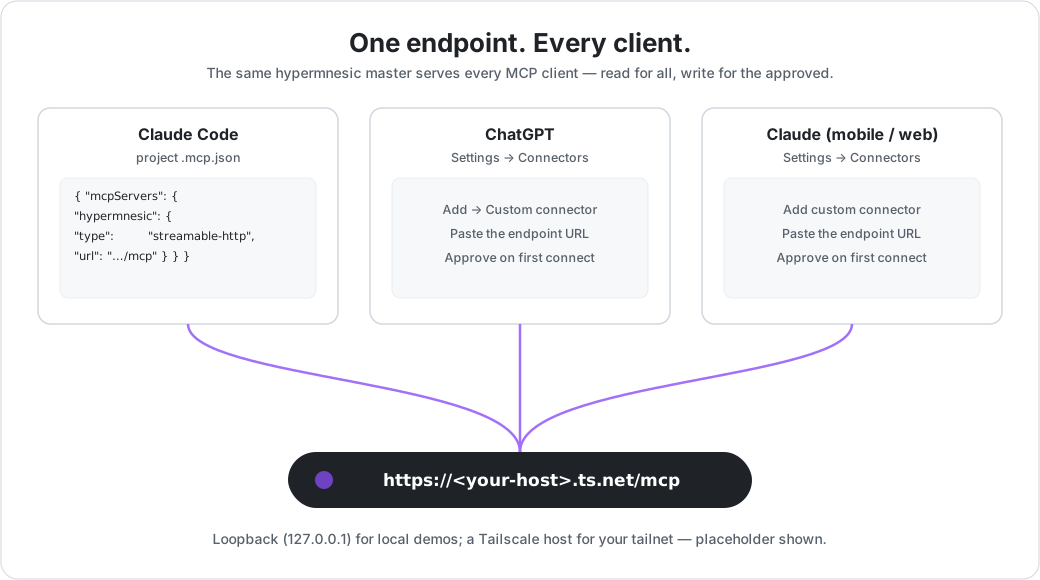
Point any MCP-capable app at your endpoint URL and it just works — OAuth is automatic (log in through the browser once, then silent refresh):
- ChatGPT, Claude (desktop, mobile, web) — add a custom connector.
- Claude Code / Codex — the bundled plugin.
- Your own agents — any MCP client, same URL.
- Obsidian — a read-only companion over your tailnet, for browsing and serendipity.
On the machine that holds the vault, skip the network entirely and use the hypermnesic CLI.
Setup details are in the Quick start below.
How it's different
Most "agent memory" keeps your memories in their store. hypermnesic keeps them as plain Markdown in your Git repo; the search index is a throwaway projection you can delete and rebuild at will. Everything else follows from that one choice.
| Question | Hypermnesic | Hosted memory layers |
|---|---|---|
| Source of truth | Markdown files in your Git repo | Service-managed memory store |
| Writes | Git-first commits — reviewable, revertible | API/app-managed writes |
| Reach | One self-hosted OAuth endpoint every client shares | Per-product API or app feature |
| Compounding | Every AI curates one shared brain | Memory siloed per app |
How it sits next to tools you may know:
- mem0 / Zep — memory APIs over a managed vector (and graph) store. Reach for them if you want a hosted memory service; reach for hypermnesic if you want your files to be the memory.
- Hindsight — also open-source agent memory, but it lives in its own vector store you run
via Docker/cloud, and it posts a higher LongMemEval score on a more lenient judge axis.
hypermnesic optimizes for owned, auditable, compounding files, not a leaderboard rank —
read the honest comparability envelope in
harness/BENCHMARKS.md. - Honcho — complementary, not competing. Honcho models who you are (preferences, style, theory-of-mind); hypermnesic holds what you know, in files. Use both.
- A database-backed personal brain — I built one before this. The database drifted from the files, and I couldn't fully trust or move it. hypermnesic is the rebuild: files are truth, the index is disposable.
Full tool-by-tool detail — including when hypermnesic is the wrong fit — is in why hypermnesic.
Try it in under 5 minutes
uv tool install hypermnesic
hypermnesic local-proof --demo-dir /tmp/hypermnesic-demoThat creates a tiny Markdown git repo, projects it into the disposable index, recalls the
repo-relative source note, and previews the exact commit_note write diff without writing
it. No account, no service.
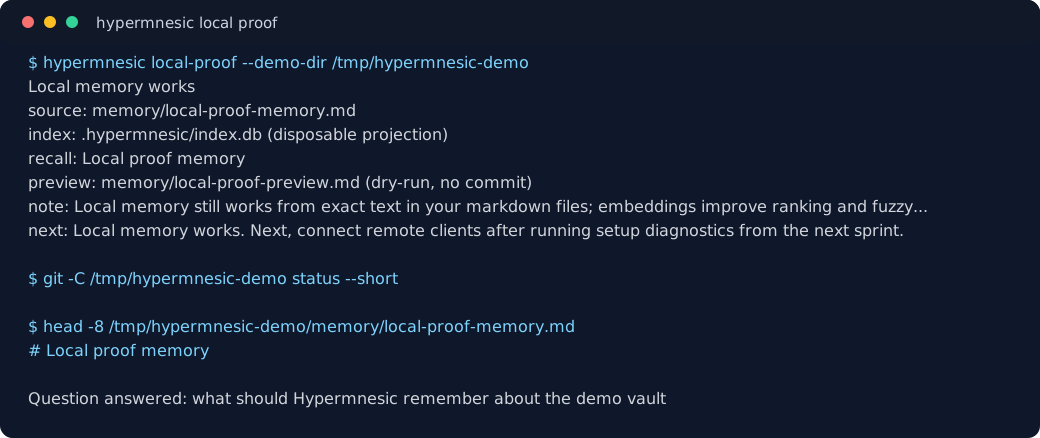
The demo source is an asciinema cast. It uses only a
generated /tmp/hypermnesic-demo vault and placeholder-safe paths.
Quick start
A. Prove local memory works
Start on the machine that holds the vault. You need only a git repo of markdown
notes. Dense embeddings improve ranking when OPENAI_API_KEY is configured, but the
proof also works offline in lexical mode.
# 1. install the engine from PyPI
uv tool install hypermnesic

# 2. prove recall from your own markdown files, with a dry-run write preview
hypermnesic local-proof /path/to/your/vault

# or try a tiny generated demo vault first
hypermnesic local-proof --demo-dir /tmp/hypermnesic-demoThe proof path validates a git-backed vault, projects committed markdown files into the
disposable .hypermnesic/ index, asks a natural-language question, returns the
repo-relative source markdown path, and shows a commit_note dry-run diff without
creating a write commit. The success milestone is Local memory works.
B. Self-host the endpoint
After the local proof succeeds, bring the shared endpoint online for remote apps. You need
Tailscale installed and logged in (tailscale up); hypermnesic
uses Tailscale Funnel for public HTTPS + automatic TLS, so there is no reverse proxy or
cert to manage.
hypermnesic setup /path/to/your/vault \
  --public-url https://<your-host>.ts.net/mcp

# later, diagnose without changing services, secrets, funnel routes, or git
hypermnesic doctor /path/to/your/vault \
--public-url https://<your-host>.ts.net/mcpsetup renders + starts a user service, generates an owner-only consent secret
(~/.config/hypermnesic-cloud/cloud.env, chmod 600), configures the Tailscale funnel
(the /mcp mount + the OAuth discovery well-knowns), then verifies the live HTTPS
discovery chain before reporting success. Re-running it converges to the same state.
It prints milestone checks, your endpoint URL, and login instructions. --resource
defaults to --public-url; pass it only when the OAuth resource identifier differs.
doctor and status report local index health, remote reach, OAuth discovery, auth
challenge, write availability, dense key source/state, vector coverage, and client-specific
next actions without mutating state. Read tools also expose degraded_reason; after an
embedding 429 they cool down provider calls while continuing to serve lexical/graph results.
Dense key lookup is repo-scoped: process
OPENAI_API_KEY wins, otherwise the target vault's gitignored .env is used even when the
command or MCP server starts from another working directory. Live OpenAI smoke checks stay
opt-in with --check-dense-live. Dense diagnostics keep credential state separate from
projection state: missing indexes point to initialization, and stale/absent vectors point to
hypermnesic converge /path/to/vault --now --json before a full reindex.
By default, new OAuth clients request read; admins can make new approvals request both
read and write with --default-client-scopes read write or
HYPERMNESIC_DEFAULT_CLIENT_SCOPES=read,write.
C. Connect a client (any remote app)
Point the app's MCP server at your endpoint URL — that's it. OAuth is automatic:
- Claude / ChatGPT (cloud connectors), Claude Code plugin, Codex: add the MCP
server URL
https://<your-host>.ts.net/mcp. On first connect the app discovers the OAuth server, opens a browser once for you to authorize, then silently refreshes. The OAuth metadata supports both confidential clients and public clients registered without a client secret. - Read vs. write: read access is the default unless the endpoint admin configures
--default-client-scopes read write/HYPERMNESIC_DEFAULT_CLIENT_SCOPES=read,write. To grant thecommit_notewrite tool, approve write on the consent page (type your approval token from~/.config/hypermnesic-cloud/cloud.env). The consent page shows exactly which scopes you're granting, lets you reject or cancel, and explains how to revoke later. - Client control: after authorization, inspect or revoke known grants on the engine
host with
hypermnesic clients list /path/to/vaultandhypermnesic clients revoke /path/to/vault <grant-id> --apply. - Claude Code / Codex plugin: install the plugin in
plugin/and setHYPERMNESIC_MCP_URLto your endpoint — the bundled.mcp.jsonis discovery-only and carries no host or token. Seeplugin/README.md. - Obsidian companion: read-only over your tailnet — point it at the tailnet read
route
http://<tailnet-ip>:8848/mcp(no OAuth; tailnet membership is the boundary). It ships from the publichypermnesic-companionrepository under GPL-3.0-or-later; the first companion release is0.3.0. Seeobsidian-plugin/README.mdand the license boundary below.
D. Use it locally (on the engine host)
The host that runs the engine skips the network entirely and uses the CLI:
hypermnesic local-proof /path/to/vault                           # first local value proof
hypermnesic retrieve /path/to/vault "what do we know about X"   # hybrid search
hypermnesic think    /path/to/vault "topic"                     # thinking-mode
hypermnesic resolve  /path/to/vault "Some Entity"               # name → page path
hypermnesic commit-note /path/to/vault notes/x.md --body "…"    # git-first write (dry-run preview)
hypermnesic memory list /path/to/vault                          # inspect/control memory
hypermnesic memory forget /path/to/vault notes/bad.md            # preview source removal
hypermnesic clients list /path/to/vault # inspect OAuth client grantsE. Know what belongs in Hypermnesic
Hypermnesic is for durable project memory: source-grounded facts, decisions, procedures,
…