synergy-age-mcp





MCP (Model Context Protocol) server for SynergyAge database
This server implements the Model Context Protocol (MCP) for SynergyAge, providing a standardized interface for accessing synergistic genetic intervention and aging research data. MCP enables AI assistants and agents to query comprehensive longevity datasets through structured interfaces.
The server automatically downloads the latest SynergyAge database and documentation from Hugging Face Hub (specifically from the synergy-age folder), ensuring you always have access to the most up-to-date data without manual file management.
The SynergyAge database contains:
- models: Experimentally validated genetic interventions and their effects on lifespan across model organisms
- model_interactions: Synergistic, antagonistic, and epistatic interactions between genetic interventions
- Data for multiple model organisms: C. elegans, Drosophila melanogaster, mice, and other aging research models
- Quantitative lifespan effects: Precise measurements of intervention effectiveness
Usage Example
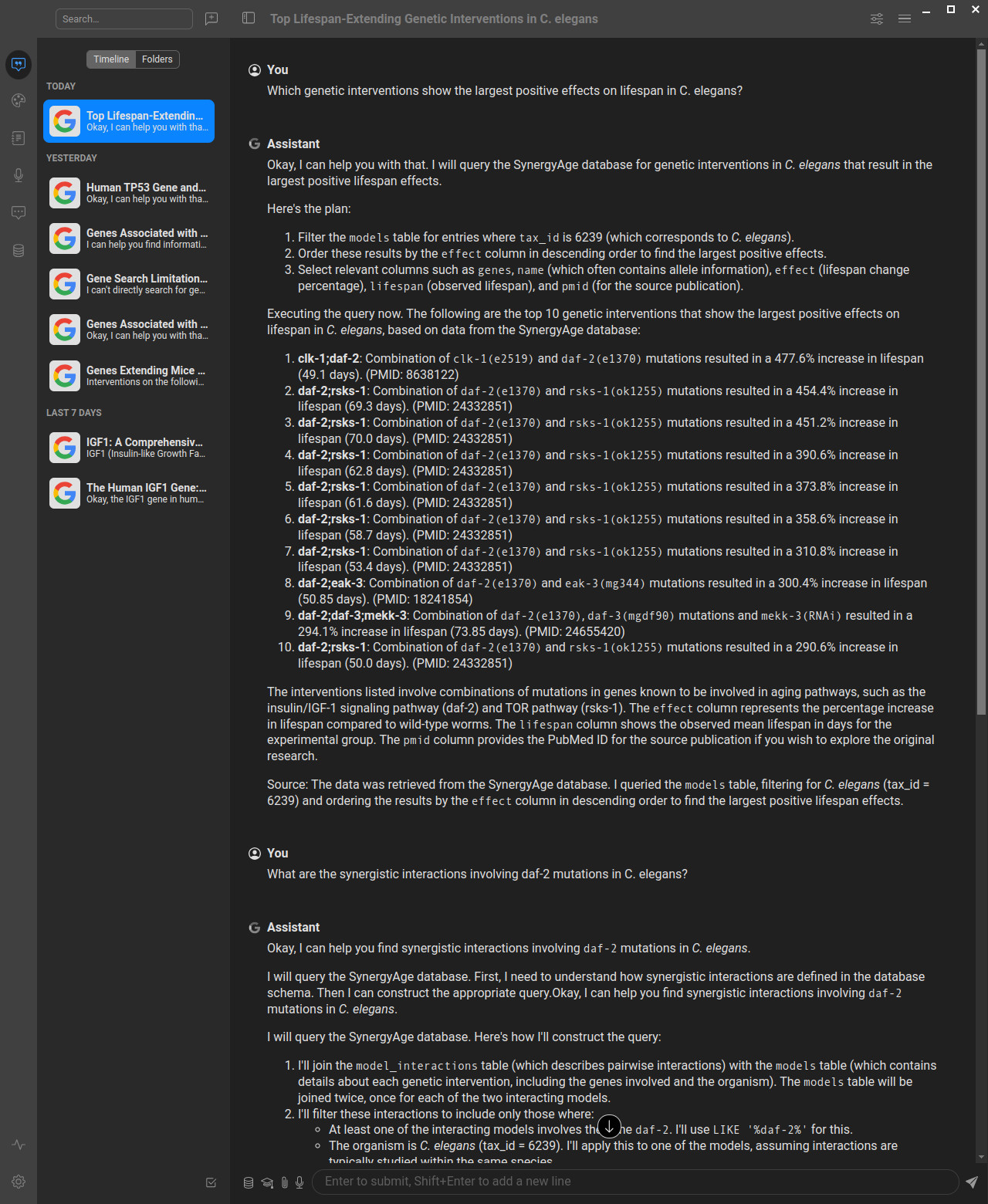
Here's how the SynergyAge MCP server works in practice with AI assistants:
Example showing how to query the SynergyAge database through an AI assistant using natural language, which gets translated to SQL queries via the MCP server. You can use this database both in chat interfaces for research questions and in AI-based development tools (like Cursor, Windsurf, VS Code with Copilot) to significantly improve your aging and longevity research productivity by having direct access to synergistic intervention data while coding.
Understanding Genetic Interactions
The SynergyAge database focuses on different types of genetic interactions that affect lifespan:
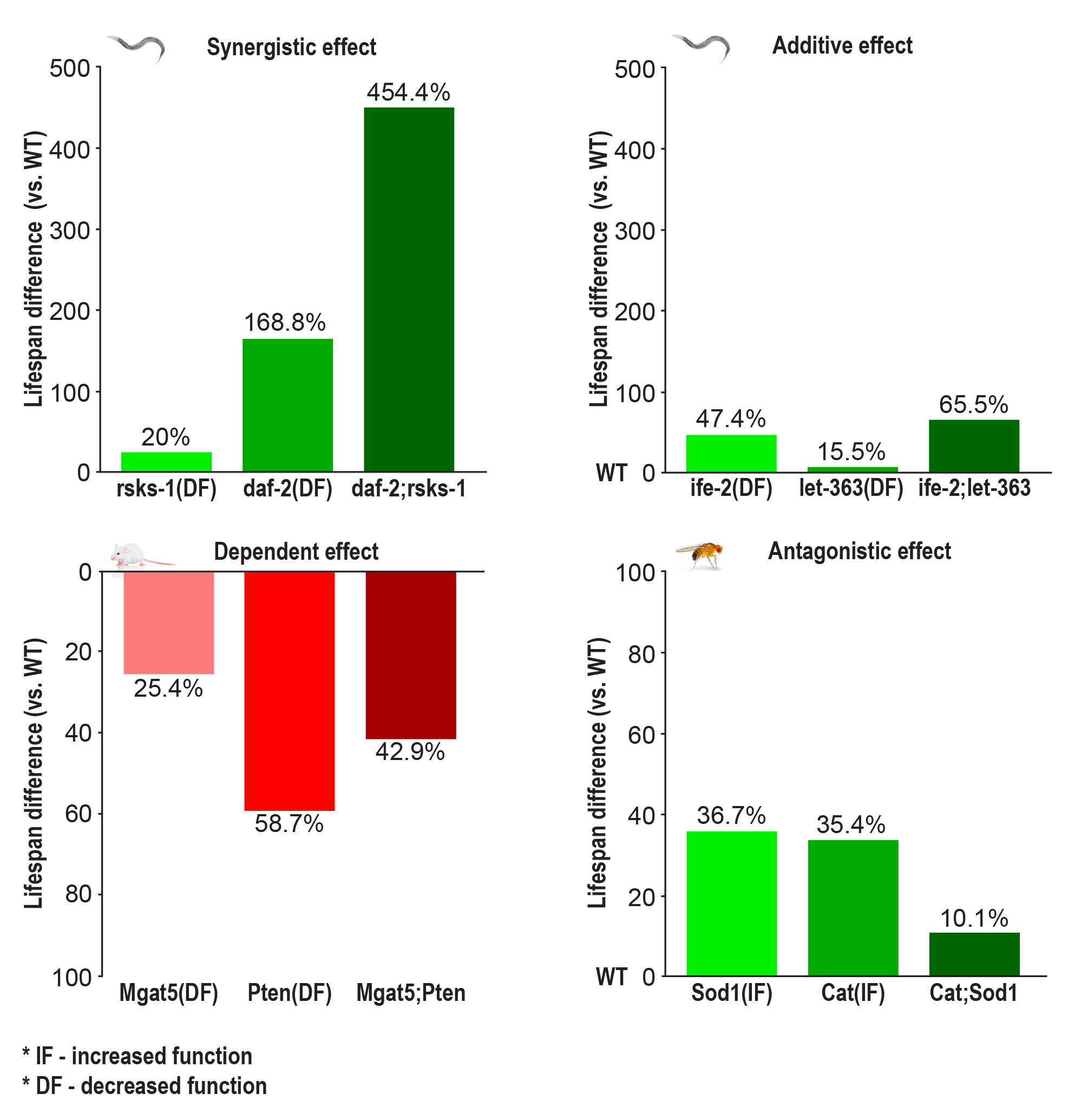
Figure: Types of genetic interactions in longevity research - synergistic, antagonistic, and additive effects between genetic interventions (Source: SynergyAge.info)
- Synergistic interactions: Combined interventions produce greater effects than the sum of individual effects
- Antagonistic interactions: Combined interventions produce smaller effects than expected, with one intervention suppressing another
- Additive interactions: Combined interventions produce effects equal to the sum of individual effects
If you want to understand more about what the Model Context Protocol is and how to use it more efficiently, you can take the DeepLearning AI Course or search for MCP videos on YouTube.
About MCP (Model Context Protocol)
MCP is a protocol that bridges the gap between AI systems and specialized domain knowledge. It enables:
- Structured Access: Direct connection to authoritative synergistic aging intervention data
- Natural Language Queries: Simplified interaction with specialized databases through SQL
- Type Safety: Strong typing and validation through FastMCP
- AI Integration: Seamless integration with AI assistants and agents
About SynergyAge
SynergyAge is a curated database containing experimentally validated data on genetic interventions affecting lifespan across multiple model organisms. The database focuses on both single-gene mutants and multi-gene combinations to understand genetic interactions in aging.
Data Validation & Quality
The SynergyAge data undergoes rigorous validation at three levels:
- Curation Level: Only papers with experimentally validated results are selected for inclusion
- Import Validation: Automatic checks ensure no missing values or incorrect data formats
- Post-deployment: Manual investigation of outliers and random entries, with lifespan distributions plotted for each mutant at different temperatures
All survival curves from included papers are manually verified to ensure data accuracy.
Key Features
- Comprehensive Search: Text search supporting multiple genes (comma or semicolon separated)
- Categorized Results: Search results grouped into four categories:
- Mutants with interventions in all searched genes
- Single-gene mutants (1-mutants)
- Multi-gene mutants with subset interventions (n-mutants)
- Extended combinations including additional genes
- Interactive Network Visualization: Visual exploration of mutant relationships with nodes representing lifespan models and edges showing genetic intervention relationships
- Epistasis Analysis: Assessment of genetic interactions between modulated genes
- External Integration: Links to KEGG pathways and model-specific databases for enhanced context
Data Source and Updates
The SynergyAge MCP server automatically downloads data from the longevity-genie/bio-mcp-data repository on Hugging Face Hub. This ensures:
- Always Up-to-Date: Automatic access to the latest SynergyAge database without manual updates
- Reliable Distribution: Centralized data hosting with version control and change tracking
- Efficient Caching: Downloaded files are cached locally to minimize network requests
- Fallback Support: Local fallback files are supported for development and offline use
The data files are stored in the synergy-age subfolder of the Hugging Face repository and include:
synergy-age.sqlite- The complete SynergyAge databasesynergyage_prompt.txt- Database schema documentation and usage guidelines
Available Tools
This server provides three main tools for interacting with the SynergyAge database:
synergyage_db_query(sql: str)- Execute read-only SQL queries against the SynergyAge databasesynergyage_get_schema_info()- Get detailed schema information including tables, columns, and data descriptionssynergyage_example_queries()- Get a list of example SQL queries with descriptions
Available Resources
resource://db-prompt- Complete database schema documentation and usage guidelinesresource://schema-summary- Formatted summary of tables and their purposes
Quick Start
Installing uv
# Download and install uv
curl -LsSf https://astral.sh/uv/install.sh | sh

# Verify installation
uv --version
uvx --versionuvx is a very nice tool that can run a python package installing it if needed.
Running with uvx
You can run the synergy-age-mcp server directly using uvx without cloning the repository:
# Run the server in streamed http mode (default)
uvx synergy-age-mcpSTDIO Mode (for MCP clients that require stdio, can be useful when you want to save files)
# Or explicitly specify stdio mode
uvx synergy-age-mcp stdioHTTP Mode (Web Server)
# Run the server in streamable HTTP mode on default (3002) port
uvx synergy-age-mcp server

# Run on a specific port
uvx synergy-age-mcp server --port 8000SSE Mode (Server-Sent Events)
# Run the server in SSE mode
uvx synergy-age-mcp sseIn cases when there are problems with uvx often they can be caused by cleaning uv cache:
uv cache cleanThe HTTP mode will start a web server that you can access at http://localhost:3002/mcp (with documentation at http://localhost:3002/docs). The STDIO mode is designed for MCP clients that communicate via standard input/output, while SSE mode uses Server-Sent Events for real-time communication.
Note: Currently, we do not have a Swagger/OpenAPI interface, so accessing the server directly in your browser will not show much useful information. To explore the available tools and capabilities, you should either use the MCP Inspector (see below) or connect through an MCP client to see the available tools.
Configuring your AI Client (Anthropic Claude Desktop, Cursor, Windsurf, etc.)
We provide preconfigured JSON files for different use cases:
- For STDIO mode (recommended): Use
mcp-config-stdio.json - For HTTP mode: Use
mcp-config.json - For local development: Use
mcp-config-stdio-debug.json
Configuration Video Tutorial
For a visual guide on how to configure MCP servers with AI clients, check out our configuration tutorial video for our sister MCP server (biothings-mcp). The configuration principles are exactly the same for the SynergyAge MCP server - just use the appropriate JSON configuration files provided above.
Inspecting SynergyAge MCP server
<details> <summary>Using MCP Inspector to explore server capabilities</summary>If you want to inspect the methods provided by the MCP server, use npx (you may need to install nodejs and npm):
For STDIO mode with uvx:
npx @modelcontextprotocol/inspector --config mcp-config-stdio.json --server synergy-age-mcpFor HTTP mode (ensure server is running first):
npx @modelcontextprotocol/inspector --config mcp-config.json --server synergy-age-mcpFor local development:
npx @modelcontextprotocol/inspector --config mcp-config-stdio-debug.json --server synergy-age-mcpYou can also run the inspector manually and configure it through the interface:
npx @modelcontextprotocol/inspectorAfter that you can explore the tools and resources with MCP Inspector at http://127.0.0.1:6274 (note, if you run inspector several times it can change port)
</details>Integration with AI Systems
Simply point your AI client (like Cursor, Windsurf, ClaudeDesktop, VS Code with Copilot, or others) to use the appropriate configuration file from the repository.
Repository setup
# Clone the repository
git clone https://github.com/longevity-genie/synergy-age-mcp.git
cd synergy-age-mcp
uv syncRunning the MCP Server
If you already cloned the repo you can run the server with uv:
# Start the MCP server locally (HTTP mode)
uv run server

# Or start in STDIO mode
uv run stdio

# Or start in SSE mode
uv run sseDatabase Schema
<details> <summary>Detailed schema information</summary>Main Tables
- models (12 columns): Experimental genetic intervention data with lifespan effects across model organisms
- model_interactions (3 columns): Synergistic, antagonistic, and epistatic interactions between genetic interventions
Key Fields
- id: Unique identifier for each genetic intervention model
- tax_id: NCBI Taxonomy ID for the model organism
- name: Descriptive name of the genetic intervention
- genes: Target genes for the intervention
- temp: Experimental temperature conditions
- lifespan: Measured lifespan values
- effect: Quantitative effect on lifespan (percentage change)
- details: Detailed description of the intervention method
- interaction_type: Classification of genetic interactions
…