tfmcp: Terraform Model Context Protocol Tool
⚠️ This project includes production-ready security features but is still under active development. While the security system provides robust protection, please review all operations carefully in production environments. ⚠️
tfmcp is a command-line tool that helps you interact with Terraform via the Model Context Protocol (MCP). It allows LLMs to manage and operate your Terraform environments, including:
🎮 Demo
See tfmcp in action with Claude Desktop:
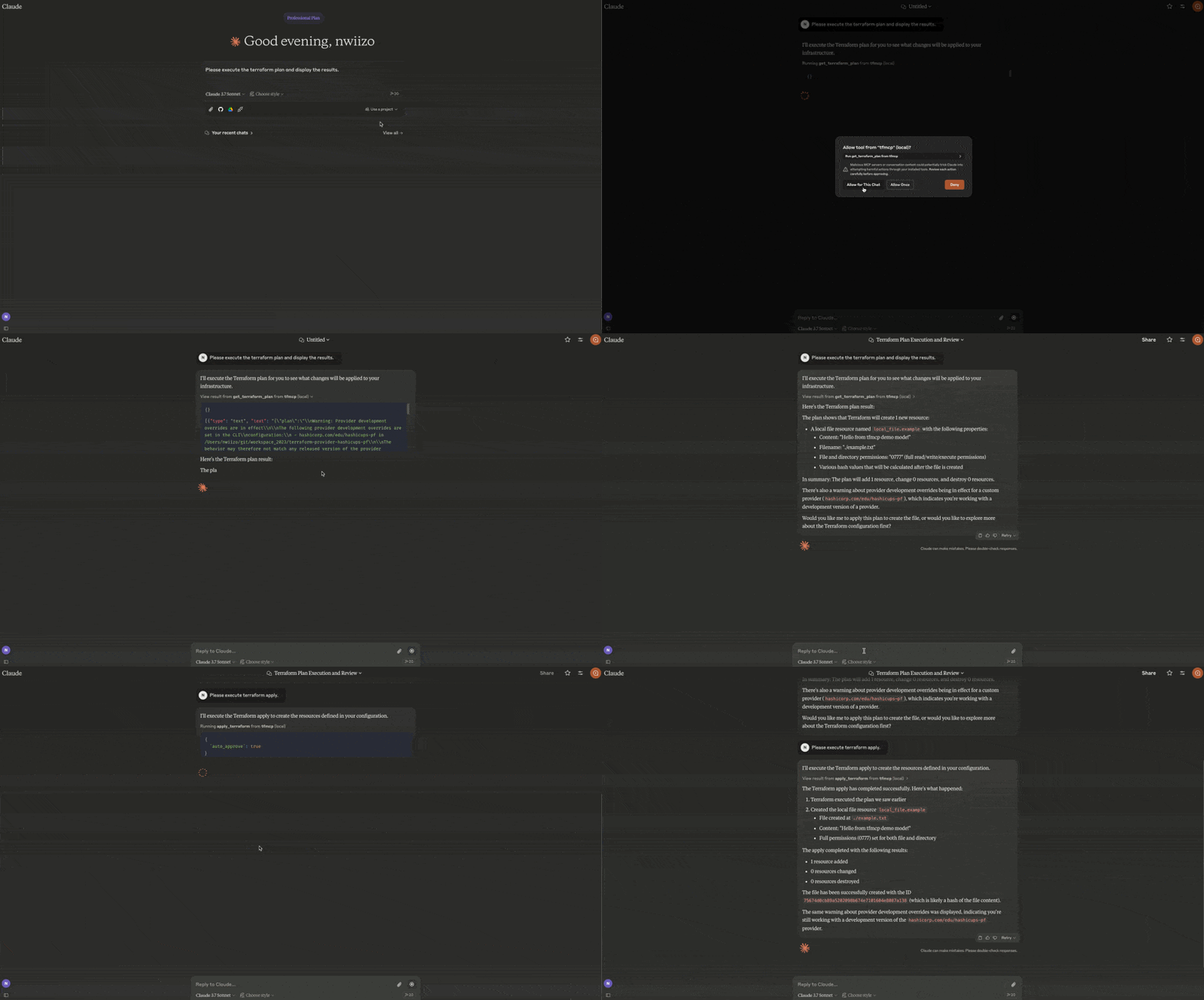
- Reading Terraform configuration files
- Analyzing Terraform plan outputs
- Applying Terraform configurations
- Managing Terraform state
- Creating and modifying Terraform configurations
🎉 Current Release
tfmcp v0.2.1 is the current release:
cargo install tfmcp --version 0.2.1What's new in v0.2.1
- HCP/TFE read coverage and explicitly gated write operations
- Streamable HTTP with loopback-safe Host and Origin validation
- Project inspection, plan review, lockfile checks, and state-safety workflows
- Terraform 1.15.8 CI and container baseline
- Rust module-boundary and duplicate-code release gates
Features
| Area | Capabilities |
|---|---|
| Local Terraform | Validate, format, plan/apply workflows, import guidance, outputs, providers, dependency graphs, refresh-only flows, and guarded state operations |
| Repository intelligence | Entrypoint/project detection, configuration analysis, quality checks, security checks, module health, plan review, and drift/state-safety inspection |
| Registry | Public/private provider, module, and policy lookup with HashiCorp-compatible aliases |
| HCP Terraform / TFE | Organizations, projects, workspaces, runs, plans, applies, variables, policy sets, variable sets, tags, stacks, and gated operations |
| MCP deployment | stdio and Streamable HTTP, toolsets, resources, health/metrics, sessions, Host/Origin validation, rate limits, TLS wiring, and audit logging |
| Packaging | Cargo, Docker/OCI metadata, MCP Registry metadata, Rust Edition 2024 |
Installation
From Source
# Clone the repository
git clone https://github.com/nwiizo/tfmcp
cd tfmcp

# Build and install
cargo install --path .From Crates.io
cargo install tfmcpUsing Docker
# Clone the repository
git clone https://github.com/nwiizo/tfmcp
cd tfmcp

# Build the Docker image
docker build -t tfmcp .

# Run the container
docker run -it tfmcpRequirements
- Rust 1.88.0+ (Rust Edition 2024)
- Terraform CLI 1.15.8 installed and available in
PATH - Claude Desktop (for AI assistant integration)
- Docker (optional, for containerized deployment)
Usage
$ tfmcp --help
✨ A CLI tool to manage Terraform configurations and operate Terraform through the Model Context Protocol (MCP).

Usage: tfmcp [OPTIONS] [COMMAND]

Commands:
  mcp       Launch tfmcp as an MCP server
  analyze   Analyze Terraform configurations
  help      Print this message or the help of the given subcommand(s)

Options:
  -c, --config <PATH>    Path to the configuration file
  -d, --dir <PATH>       Terraform project directory
  -V, --version          Print version
-h, --help Print helpUsing Docker
When using Docker, you can run tfmcp commands like this:
# Run as MCP server (default)
docker run -it tfmcp

# Run with specific command and options
docker run -it tfmcp analyze --dir /app/example

# Mount your Terraform project directory
docker run -it -v /path/to/your/terraform:/app/terraform tfmcp --dir /app/terraform

# Set environment variables
docker run -it -e TFMCP_LOG_LEVEL=debug tfmcpIntegrating with Claude Desktop
To use tfmcp with Claude Desktop:
-
If you haven't already, install tfmcp:
cargo install tfmcpAlternatively, you can use Docker:
docker build -t tfmcp . -
Find the path to your installed tfmcp executable:
which tfmcp -
Add the following configuration to
~/Library/Application\ Support/Claude/claude_desktop_config.json:
{
  "mcpServers": {
    "tfmcp": {
      "command": "/path/to/your/tfmcp",  // Replace with the actual path from step 2
      "args": ["mcp"],
      "env": {
        "HOME": "/Users/yourusername",  // Replace with your username
        "PATH": "/usr/local/bin:/usr/bin:/bin:/usr/sbin:/sbin",
        "TERRAFORM_DIR": "/path/to/your/terraform/project"  // Optional: specify your Terraform project
      }
    }
  }
}If you're using Docker with Claude Desktop, you can set up the configuration like this:
{
  "mcpServers": {
    "tfmcp": {
      "command": "docker",
      "args": ["run", "--rm", "-v", "/path/to/your/terraform:/app/terraform", "tfmcp", "mcp"],
      "env": {
        "TERRAFORM_DIR": "/app/terraform"
      }
    }
  }
}-
Restart Claude Desktop and enable the tfmcp tool.
-
tfmcp will automatically create a sample Terraform project in
~/terraformif one doesn't exist, ensuring Claude can start working with Terraform right away. The sample project is based on the examples included in theexample/demodirectory of this repository.
MCP Tools
tfmcp provides 82 MCP tools for AI assistants:
Core Terraform Operations
| Tool | Description |
|---|---|
init_terraform | Initialize Terraform working directory |
get_terraform_plan | Generate and show execution plan |
analyze_plan | NEW Analyze plan with risk scoring and recommendations |
apply_terraform | Apply Terraform configuration |
destroy_terraform | Destroy Terraform-managed infrastructure |
validate_terraform | Validate configuration syntax |
validate_terraform_detailed | Detailed validation with guidelines |
get_terraform_state | Show current state |
analyze_state | NEW Analyze state with drift detection |
review_terraform_plan | Review plan risk, blockers, destructive changes, and recommendations |
summarize_plan_for_pr | Generate markdown plan summary for PR comments |
run_terraform_quality_checks | Run CI-friendly validation, module health, guideline, and lockfile checks |
inspect_state_safety | Inspect state readability, drift risk, lockfile status, and blockers |
detect_drift_candidates | Detect drift candidates from readable state without modifying infrastructure |
prepare_terraform_change | Generate blockers, warnings, and a recommended change sequence |
list_terraform_resources | List all managed resources |
set_terraform_directory | Change active project directory |
Workspace & State (v0.1.9)
| Tool | Description |
|---|---|
terraform_workspace | NEW Manage workspaces (list, show, new, select, delete) |
terraform_import | NEW Import existing resources |
terraform_taint | NEW Taint/untaint resources |
terraform_refresh | NEW Refresh state |
Code & Output (v0.1.9)
| Tool | Description |
|---|---|
terraform_fmt | NEW Format code |
terraform_graph | NEW Generate dependency graph |
terraform_output | NEW Get output values |
terraform_providers | NEW Get provider info with lock file |
check_provider_lockfile | Check .terraform.lock.hcl for reproducible provider selections |
Analysis & Security
| Tool | Description |
|---|---|
analyze_terraform | Analyze configuration |
inspect_terraform_project | Inspect local Terraform directories, modules, and likely entrypoints |
detect_terraform_entrypoints | Detect likely root module entrypoints |
analyze_module_health | Module health with cohesion/coupling metrics |
get_resource_dependency_graph | Resource dependencies visualization |
suggest_module_refactoring | Refactoring suggestions |
get_security_status | Security scan with secret detection |
Registry
| Tool | Description |
|---|---|
search_providers | Search providers (HashiCorp-compatible alias) |
search_terraform_providers | Search providers |
get_provider_details | Provider details (HashiCorp-compatible alias) |
get_provider_info | Provider details |
get_provider_docs | Provider documentation |
get_provider_capabilities | Provider resources, data sources, functions, and guides |
search_modules | Search modules (HashiCorp-compatible alias) |
search_terraform_modules | Search modules |
get_module_details | Module details |
get_latest_module_version | Latest module version |
get_latest_provider_version | Latest provider version |
search_policies | Search Sentinel/OPA policy libraries |
get_policy_details | Policy library details |
HCP Terraform / Terraform Enterprise (Read-only)
| Tool | Description |
|---|---|
get_token_permissions | Inspect configured token account details without exposing the token |
list_terraform_orgs | List visible organizations |
list_terraform_projects | List projects in an organization |
list_workspaces | List workspaces in an organization |
get_workspace_details | Get workspace details by ID or organization/name |
list_runs | List workspace runs |
get_run_details | Get run details |
get_plan_details | Get plan details |
get_plan_logs | Get plan logs |
get_plan_json_output | Get Terraform JSON plan output |
get_apply_details | Get apply details |
get_apply_logs | Get apply logs |
get_workspace_policy_sets | Get policy sets attached to a workspace |
list_workspace_variables | List workspace variables |
list_variable_sets | List organization variable sets |
read_workspace_tags | Read workspace tags |
list_stacks | List Terraform stacks |
get_stack_details | Get Terraform stack details |
search_private_modules | Search private registry modules |
get_private_module_details | Get private registry module details |
search_private_providers | Search private registry providers |
get_private_provider_details | Get private registry provider details |
HCP Terraform / Terraform Enterprise (Gated Operations)
| Tool | Description |
|---|---|
create_workspace | Create a workspace when ENABLE_TF_OPERATIONS=true |
update_workspace | Update workspace settings when ENABLE_TF_OPERATIONS=true |
delete_workspace_safely | Use the safe-delete workspace action when ENABLE_TF_OPERATIONS=true |
create_run | Queue a run when ENABLE_TF_OPERATIONS=true |
action_run | Apply, discard, cancel, force-cancel, or force-execute a run when ENABLE_TF_OPERATIONS=true |
create_workspace_variable | Create a workspace variable when ENABLE_TF_OPERATIONS=true |
update_workspace_variable | Update a workspace variable when ENABLE_TF_OPERATIONS=true |
attach_policy_set_to_workspace | Attach a policy set to a workspace when ENABLE_TF_OPERATIONS=true |
create_variable_set | Create a variable set when ENABLE_TF_OPERATIONS=true |
create_variable_in_variable_set | Create a variable in a variable set when ENABLE_TF_OPERATIONS=true |
delete_variable_in_variable_set | Delete a variable from a variable set when ENABLE_TF_OPERATIONS=true |
attach_variable_set_to_workspaces | Attach a variable set to workspaces when ENABLE_TF_OPERATIONS=true |
detach_variable_set_from_workspaces | Detach a variable set from workspaces when ENABLE_TF_OPERATIONS=true |
create_workspace_tags | Create or attach workspace tags when ENABLE_TF_OPERATIONS=true |
MCP Resources
| URI | Description |
|---|---|
terraform://style-guide / /terraform/style-guide | Terraform style guide |
terraform://module-development / /terraform/module-development | Terraform module development guide |
| `terraform://best-pra |
…