PhpCodeArcheology



PhpCodeArcheology is a PHP static analysis tool that measures code quality through 60+ metrics including cyclomatic complexity, maintainability index, coupling, and cohesion. It generates comprehensive reports for files, classes, methods, and functions — detecting code smells, identifying hotspots via git churn analysis, and tracking quality trends over time.
Unlike PHPStan or Psalm (which focus on type safety and bug detection), PhpCodeArcheology focuses on architecture and maintainability — giving you the insights you need to understand and improve your codebase structure. Think of it as an alternative to PHPMetrics with deeper git integration, baseline management, and AI-ready output.
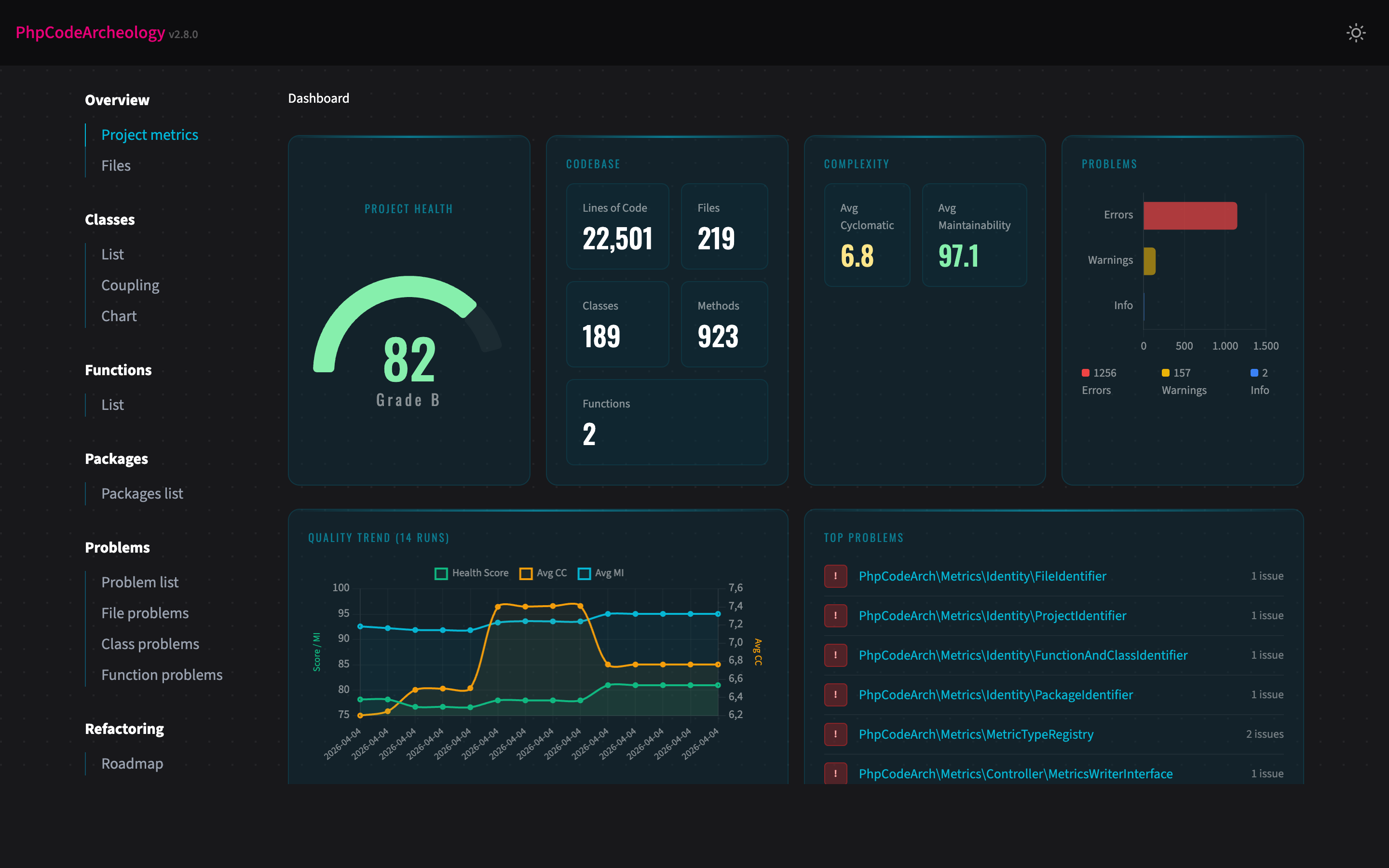
Features
- 60+ code quality metrics per file, class, and function — cyclomatic complexity, cognitive complexity, maintainability index, LCOM, Halstead metrics, coupling, instability, and more
- Problem detection with 14 built-in rules — God Class, too complex, dead code, security smells, SOLID violations, deep inheritance, low type coverage, untested complex code
- Test analysis — auto-detects PHPUnit/Pest/Codeception, maps test files to production classes, integrates Clover XML for line-level coverage, highlights untested hotspots
- Git integration — churn analysis, hotspot detection (high churn + high complexity), author tracking
- Source code display — view method source code directly in the HTML report with PHP syntax highlighting and a nesting-depth heatmap that reveals complexity hotspots at a glance (details below)
- Multiple report formats — interactive HTML, Markdown, JSON, SARIF (GitHub Code Scanning), AI summary, Knowledge Graph (JSON)
- Health Score — single 0-100 score with A-F grading for your entire project
- Technical Debt Score — weighted problem score normalised per 100 logical lines of code
- History tracking — trend charts across multiple analysis runs
- Baseline management — track only new problems, ignore existing ones (ideal for legacy projects)
- CI/CD ready — configurable exit codes, SARIF for GitHub Code Scanning, JSON for custom tooling
- Quick mode — fast terminal-only output without report generation
- CLAUDE.md generation — auto-generated project overview for AI coding assistants
- AI integration — native MCP server for AI assistants like Claude Code (details below)
Quick Start
composer require --dev php-code-archeology/php-code-archeology
./vendor/bin/phpcodearcheologyNo config file needed — the tool works out of the box. It scans your src directory and creates an HTML report in tmp/report. Open tmp/report/index.html in your browser.
Tip: Add
tmp/reportto your.gitignoreto keep generated reports out of version control.
Table of Contents
- Prerequisites
- Installation
- Using the Composer Plugin
- CLI Options
- Subcommands
- Configuration
- Test Analysis
- Report Types
- Source Code Display
- Knowledge Graph Export
- Key Metrics
- AI Integration (MCP Server)
- Understanding the Health Score
- Memory and Performance
- A Note on Metric Accuracy (v2.7.0)
- Development
- Roadmap
- Contributing
Prerequisites
- PHP 8.2 or higher (works on 8.2, 8.3, 8.4, 8.5)
- Composer
Installation
composer require --dev php-code-archeology/php-code-archeologyGlobal Installation
composer global require php-code-archeology/php-code-archeologyMake sure ~/.composer/vendor/bin (or ~/.config/composer/vendor/bin) is in your $PATH. Then run from any directory:
phpcodearcheology /path/to/your/projectDocker
docker build -t phpcodearcheology https://github.com/PhpCodeArcheology/PhpCodeArcheology.gitRun against a local project:
docker run --rm -v "$(pwd)":/project -v "$(pwd)/report":/output phpcodearcheology /projectThis mounts your project into the container and writes the HTML report to ./report/.
PHAR (for legacy codebases)
If your project has dependency conflicts with PhpCodeArcheology's requirements (e.g. an older nikic/php-parser version), download the standalone PHAR from the Releases page. The PHAR ships all dependencies bundled, so it works without touching your project's composer.json.
# Download the PHAR and checksum from the latest release
curl -LO https://github.com/PhpCodeArcheology/PhpCodeArcheology/releases/latest/download/phpcodearcheology.phar
curl -LO https://github.com/PhpCodeArcheology/PhpCodeArcheology/releases/latest/download/phpcodearcheology.phar.sha256

# Verify checksum
shasum -a 256 -c phpcodearcheology.phar.sha256   # macOS
sha256sum -c phpcodearcheology.phar.sha256       # Linux

# Run it (PHP 8.2+)
php phpcodearcheology.phar --quick src/Use the PHAR when: your project's dependencies collide with PhpCodeArcheology's, you want a CI step without a composer require --dev, or you analyse a legacy codebase where adding dev-deps is risky.
Using the Composer Plugin
PhpCodeArcheology registers itself as a Composer plugin, so you can run the analysis directly via Composer:
composer codearch:analyzeWhen no path is given and no config file exists, it automatically detects your PSR-4 source directories from composer.json. All CLI options are supported:
composer codearch:analyze -- --quick
composer codearch:analyze -- --report-type=json --coverage-file=clover.xml
composer codearch:analyze -- src/ lib/To create a config file interactively:
./vendor/bin/phpcodearcheology initCLI Options
./vendor/bin/phpcodearcheology [options] [path...]| Option | Description |
|---|---|
--report-type=TYPE | Report format: html (default), markdown, json, sarif, ai-summary, graph. Comma-separated for multiple: html,json |
--report-dir=DIR | Output directory (default: tmp/report) |
--quick | Fast analysis with terminal output only, no report generation |
--no-color | Disable coloured terminal output (also respects NO_COLOR env) |
--fail-on=LEVEL | Exit 1 on error or warning (for CI pipelines) |
--generate-claude-md | Generate a CLAUDE.md project overview |
--git-root=DIR | Git repository root (default: current directory) |
--extensions=EXT | File extensions to analyse (comma-separated, default: php) |
--exclude=DIR | Directories to exclude (comma-separated) |
--coverage-file=FILE | Clover XML coverage file from PHPUnit/Pest for line-level coverage data |
--source-code | Include source code with syntax highlighting and nesting heatmap in the HTML report (details below) |
--version | Show version |
Subcommands
init — Create Config File
./vendor/bin/phpcodearcheology initInteractively creates a php-codearch-config.yaml with sensible defaults. Detects common source directories (src, app, lib) automatically.
compare — Compare Two Reports
./vendor/bin/phpcodearcheology compare report-before.json report-after.jsonShows a delta view of metrics, problem counts, and lists new/resolved problems. Useful for answering: "Did my refactoring actually help?"
baseline — Track New Problems Only
./vendor/bin/phpcodearcheology baseline create src
./vendor/bin/phpcodearcheology baseline check srccreate saves the current problem set as a baseline. check runs a fresh analysis and reports only problems that are new compared to the baseline. Returns exit code 1 if new errors are found — ideal for CI pipelines on legacy projects.
Configuration
Create a php-codearch-config.yaml in your project root (or use init):
include:
  - "src"

exclude:
  - "vendor"

extensions:
  - "php"

packageSize: 2

reportDir: "tmp/report"
reportType: "html"

git:
  enable: true
  since: "6 months ago"
  root: "."  # Git repository root (useful for monorepos or subdirectory analysis)

graph:
  methodCalls: true  # Track cross-class method calls in the knowledge graph (default: true)

php:
  version: "8.2"       # Target PHP version for parsing (default: host PHP version)
  shortOpenTags: false  # Treat <? as PHP open tag (default: false)

framework:
  detect: true                    # Auto-detect Symfony/Laravel/Doctrine from composer.json (default: true)
  adjustments:
    doctrineCycles: true          # Downgrade Entity↔Repository cycles to info (default: true)
    entityCycles: true            # Downgrade Entity↔Entity ORM cycles to info (default: true)
    controllerThresholds: true    # Raise dependency thresholds for controllers (default: true)

qualityGate:
  maxErrors: 0
  maxWarnings: 10

thresholds:
  tooLong:
    file: 400
    class: 300
    function: 40
    method: 30
  tooComplex:
    cc: 10
    ccLargeCode: 20
    difficulty: 20
    cognitiveComplexity: 15
    avgMethodCc: 10
  tooManyParameters:
    warning: 4
    error: 7
  tooDependent:
    function: 10
    class: 20
  lowTypeCoverage:
    warning: 60
    error: 40
  deepInheritance:
    warning: 4
    error: 6
  tooMuchHtml:
    filePercent: 25
    classPercent: 10
    fileOutput: 10
    classOutput: 4
  hotspot:
    minChurn: 10
    minCc: 15
  lcomExclude:
    patterns:        # Class name patterns to skip LCOM warnings (fnmatch)
      - "*Exception"
      - "*Error"
    interfaces:      # Implemented interfaces that justify low cohesion
      - "EventSubscriberInterface"
- "EventListenerInterface"Note: Enums, interfaces, traits, and classes with 0-1 methods are always excluded from LCOM warnings regardless of configuration.
All threshold values shown above are the defaults. You only need to specify values you want to override.
Test Analysis
PhpCodeArcheology automatically detects your test infrastructure from composer.json (PHPUnit, Pest, or Codeception) and maps test files to production classes using PSR-4 namespaces, naming conventions, and directory structure.
What you get out of the box:
- Per-class
hasTestflag and test file count in the HTML/Markdown/JSON reports UntestedComplexCodewarnings for classes with cyclomatic complexity ≥ 8 and no tests (only when test infrastructure is detected)untestedas a refactoring priority driver- A Tests page in the HTML and Markdown reports with a coverage gaps table and dashboard tiles
Important note on Pest: Pest's function-based tests (it(...), test(...)) contain no class declaration and cannot be mapped to production classes by name alone. To get accurate coverage for Pest projects, generate a Clover XML repo
…