





NCP - Natural Context Provider
</div>1 MCP to rule them all
Your MCPs, supercharged. Find any tool instantly, execute with code mode, run on schedule, discover skills, load Photons, ready for any client. Smart loading saves tokens and energy.
Related Portel project: Photon turns TypeScript methods into reliable agent-facing capabilities: MCP tools, embedded app UIs, CLI commands, web routes, schedules, webhooks, retries, and Beam interfaces. NCP helps agents discover and operate tools; Photon helps developers build the tools and apps agents can trust.
💍 What is NCP?
Instead of your AI juggling 50+ tools scattered across different MCPs, NCP gives it a single, unified interface with code mode execution, scheduling, skills discovery, and custom Photons.
Your AI sees just 2-3 simple tools:
find- Search for any tool, skill, or Photon: "I need to read a file" → finds the right tool automaticallycode- Execute TypeScript directly:await github.create_issue({...})(code mode, enabled by default)run- Execute tools individually (when code mode is disabled)
Behind the scenes, NCP manages all 50+ tools + skills + Photons: routing requests, discovering the right capability, executing code, scheduling tasks, managing health, and caching responses.
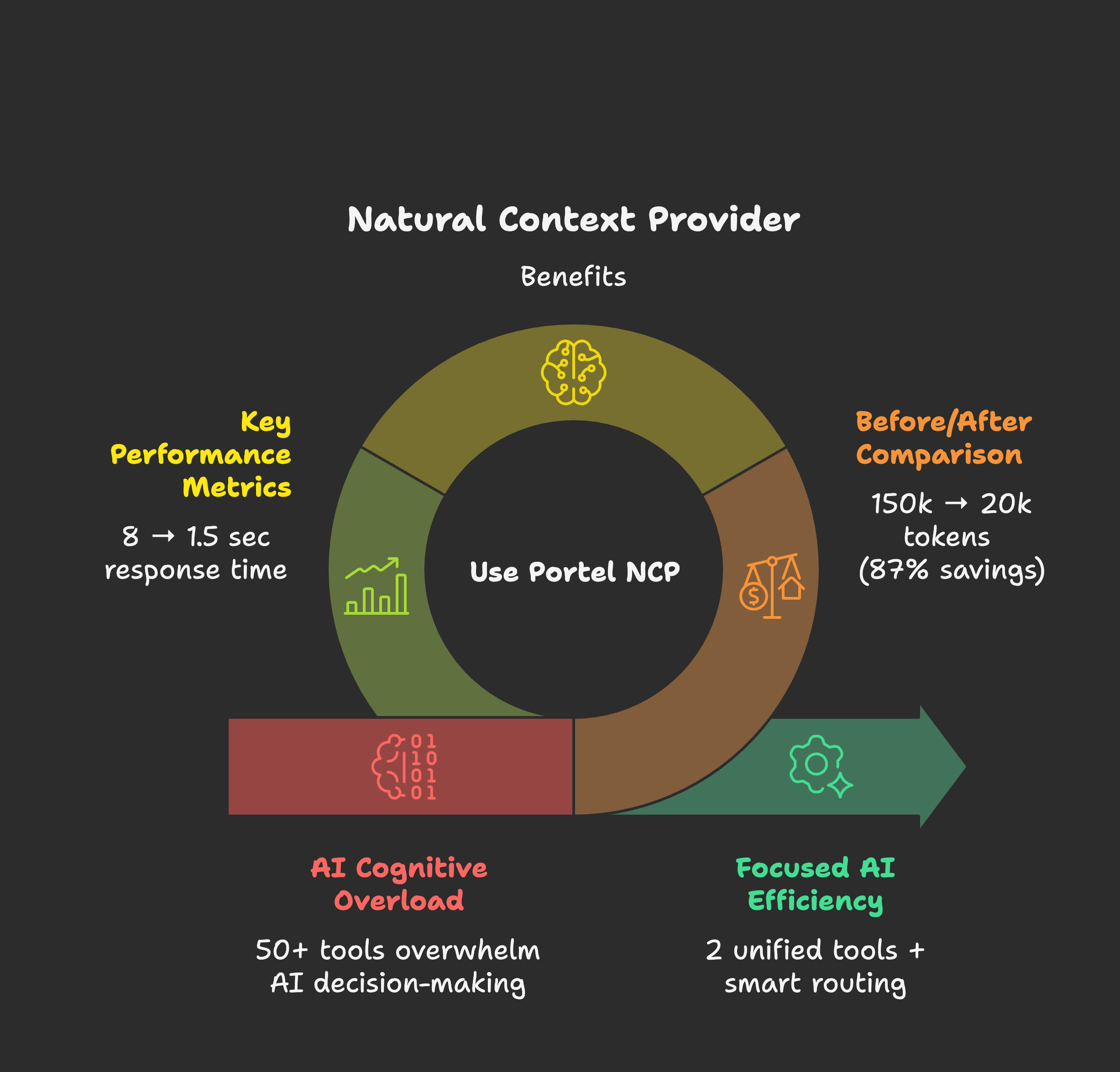
Why this matters:
- Your AI stops analyzing "which tool do I use?" and starts doing actual work
- Code mode lets AI write multi-step TypeScript workflows combining tools, skills, and scheduling
- Skills provide domain expertise: canvas design, PDF manipulation, document generation, more
- Photons enable custom TypeScript MCPs without npm publishing
- 97% fewer tokens burned on tool confusion (2,500 vs 103,000 for 80 tools)
- 5x faster responses (sub-second tool selection vs 5-8 seconds)
- Your AI becomes focused. Not desperate.
🚀 NEW: Project-level configuration - each project can define its own MCPs automatically
What's MCP? The Model Context Protocol by Anthropic lets AI assistants connect to external tools and data sources. Think of MCPs as "plugins" that give your AI superpowers like file access, web search, databases, and more.
📑 Quick Navigation
- The Problem - Why too many tools break your AI
- The Solution - How NCP transforms your experience
- Getting Started - Installation & quick start
- Try It Out - See the CLI in action
- Supercharged Features - How NCP empowers your MCPs
- Setup by Client - Claude Desktop, Cursor, VS Code, etc.
- Popular MCPs - Community favorites to add
- Advanced Features - Project config, scheduling, remote MCPs
- Troubleshooting - Common issues & solutions
- How It Works - Technical deep dive
- Contributing - Help us improve NCP
😤 The MCP Paradox: From Assistant to Desperate
You gave your AI assistant 50 tools to be more capable. Instead, you got desperation:
- Paralyzed by choice ("Should I use
read_fileorget_file_content?") - Exhausted before starting ("I've spent my context limit analyzing which tool to use")
- Costs explode (50+ tool schemas burn tokens before any real work happens)
- Asks instead of acts (used to be decisive, now constantly asks for clarification)
🧸 Why Too Many Tools Break the System
Think about it like this:
A child with one toy → Treasures it, masters it, creates endless games with it A child with 50 toys → Can't hold them all, gets overwhelmed, stops playing entirely
Your AI is that child. MCPs are the toys. More isn't always better.
The most creative people thrive with constraints, not infinite options. A poet given "write about anything" faces writer's block. Given "write a haiku about rain"? Instant inspiration.
Your AI is the same. Give it one perfect tool → Instant action. Give it 50 tools → Cognitive overload. NCP provides just-in-time tool discovery so your AI gets exactly what it needs, when it needs it.
📊 The Before & After Reality
Before NCP: Desperate Assistant 😵💫
When your AI assistant manages 50 tools directly:
🤖 AI Assistant Context:
├── Filesystem MCP (12 tools) ─ 15,000 tokens
├── Database MCP (8 tools) ─── 12,000 tokens
├── Web Search MCP (6 tools) ── 8,000 tokens
├── Email MCP (15 tools) ───── 18,000 tokens
├── Shell MCP (10 tools) ───── 14,000 tokens
├── GitHub MCP (20 tools) ──── 25,000 tokens
└── Slack MCP (9 tools) ────── 11,000 tokens

💀 Total: 80 tools = 103,000 tokens of schemasWhat happens:
- AI burns 50%+ of context just understanding what tools exist
- Spends 5-8 seconds analyzing which tool to use
- Often picks wrong tool due to schema confusion
- Hits context limits mid-conversation
After NCP: Executive Assistant ✨
With NCP as Chief of Staff:
🤖 AI Assistant Context:
└── NCP (2 unified tools) ──── 2,500 tokens

🎯 Behind the scenes: NCP manages all 80 tools
📈 Context saved: 100,500 tokens (97% reduction!)
⚡ Decision time: Sub-second tool selection
🎪 AI behavior: Confident, focused, decisiveReal results from our testing:
| Your MCP Setup | Without NCP | With NCP | Token Savings |
|---|---|---|---|
| Small (5 MCPs, 25 tools) | 15,000 tokens | 8,000 tokens | 47% saved |
| Medium (15 MCPs, 75 tools) | 45,000 tokens | 12,000 tokens | 73% saved |
| Large (30 MCPs, 150 tools) | 90,000 tokens | 15,000 tokens | 83% saved |
| Enterprise (50+ MCPs, 250+ tools) | 150,000 tokens | 20,000 tokens | 87% saved |
Translation:
- 5x faster responses (8 seconds → 1.5 seconds)
- 12x longer conversations before hitting limits
- 90% reduction in wrong tool selection
- Zero context exhaustion in typical sessions
📋 Prerequisites
- Node.js 18+ (Download here)
- npm (included with Node.js) or npx for running packages
- Command line access (Terminal on Mac/Linux, Command Prompt/PowerShell on Windows)
🚀 Installation
Choose your MCP client for setup instructions:
| Client | Description | Setup Guide |
|---|---|---|
| Claude Desktop | Anthropic's official desktop app. Best for NCP - one-click .dxt install with auto-sync | → Full Guide |
| Claude Code | Terminal-first AI workflow. Works out of the box! | Built-in support |
| VS Code | GitHub Copilot with Agent Mode. Use NCP for semantic tool discovery | → Setup |
| Cursor | AI-first code editor with Composer. Popular VS Code alternative | → Setup |
| Windsurf | Codeium's AI-native IDE with Cascade. Built on VS Code | → Setup |
| Cline | VS Code extension for AI-assisted development with MCP support | → Setup |
| Continue | VS Code AI assistant with Agent Mode and local LLM support | → Setup |
| Want more clients? | See the full list of MCP-compatible clients and tools | Official MCP Clients • Awesome MCP |
| Other Clients | Any MCP-compatible client via npm | Quick Start ↓ |
Quick Start (npm)
For advanced users or MCP clients not listed above:
Step 1: Install NCP
npm install -g @portel/ncpStep 2: Import existing MCPs (optional)
ncp config import # Paste your config JSON when promptedStep 3: Configure your MCP client
Add to your client's MCP configuration:
{
  "mcpServers": {
    "ncp": {
      "command": "ncp"
    }
  }
}✅ Done! Your AI now sees just 2 tools instead of 50+.
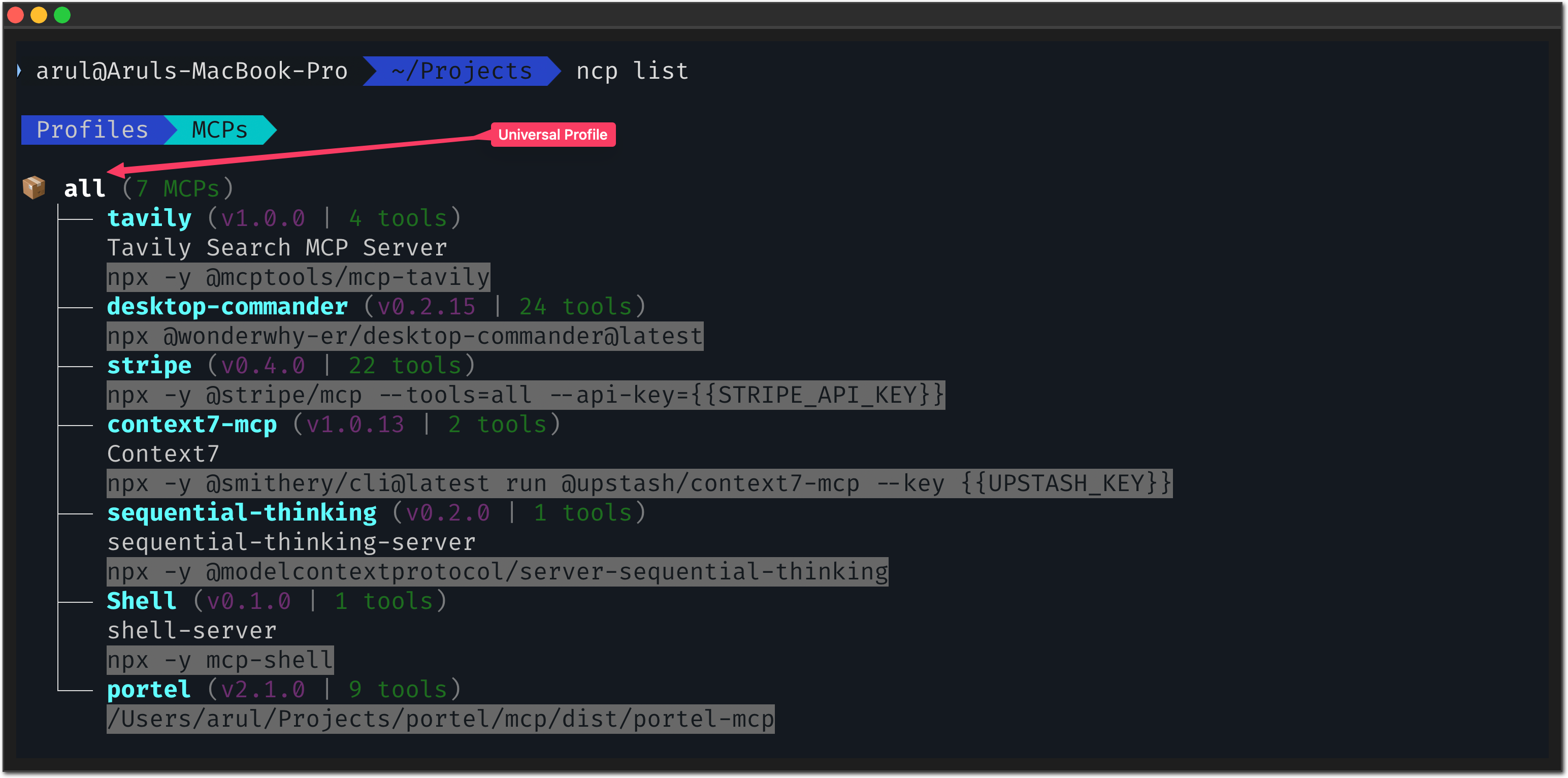
🧪 Test Drive: See the Difference Yourself
Want to experience what your AI experiences? NCP has a human-friendly CLI:
🔍 Smart Discovery
# Ask like your AI would ask:
ncp find "I need to read a file"
ncp find "help me send an email"
ncp find "search for something online"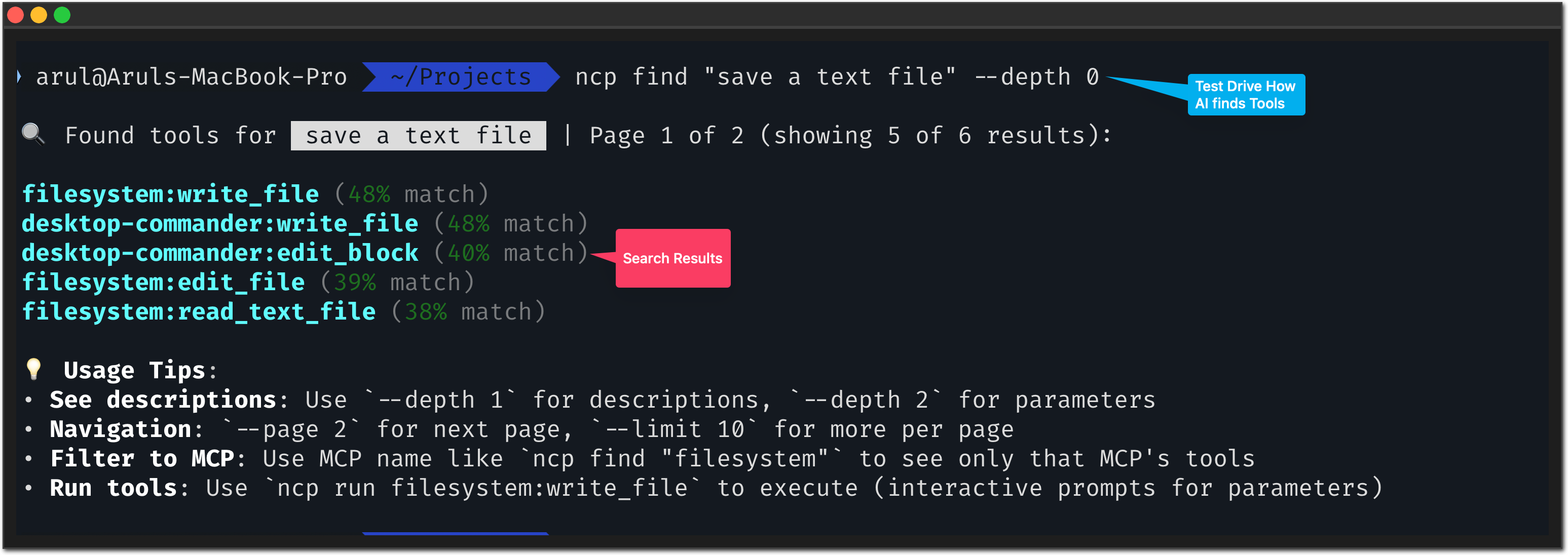
Notice: NCP understands intent, not just keywords. Just like your AI needs.
📋 Ecosystem Overview
# See your complete MCP ecosystem:
ncp list --depth 2

# Get help anytime:
ncp --help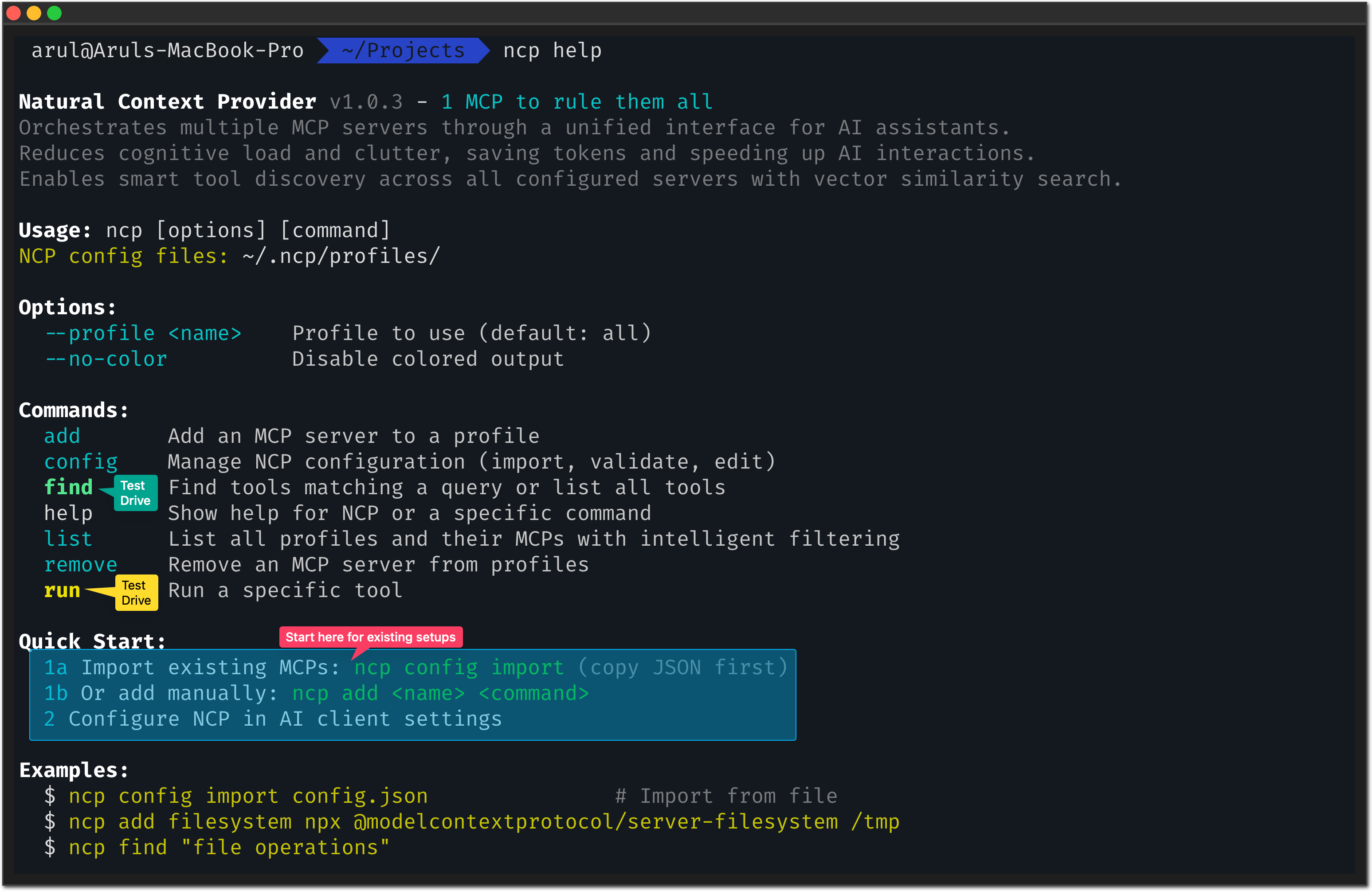
⚡ Direct Testing
# Test any tool safely:
ncp run filesystem read_file --path "/tmp/test.txt"Why this matters: You can debug and test tools directly, just like your AI would use them.
✅ Verify Everything Works
# 1. Check NCP is installed correctly
ncp --version

# 2. Confirm your MCPs are imported
ncp list

# 3. Test tool discovery
ncp find "file"

# 4. Test a simple tool (if you have filesystem MCP)
ncp run filesystem read_file --path "/tmp/test.txt" --dry-run✅ Success indicators:
- NCP shows version number
ncp listshows your imported MCPsncp findreturns relevant tools- Your AI client shows only NCP in its tool list
💪 From Tools to Automation: The Real Power
You've seen find (discover tools) and code (execute TypeScript). Individually, they're useful. Together with scheduling, they become an automation powerhouse.
A Real Example: The MCP Conference Scraper
We wanted to stay on top of MCP-related conferences and workshops for an upcoming release. Instead of manually checking websites daily, we asked Claude:
"Set up a daily scraper that finds MCP conferences and saves them to a CSV file"
What Claude did:
-
Used
codeto write the automation:// Search the web for MCP conferences const results = await web.search({ query: "Model Context Protocol conference 2025" }); // Read each result and extract details for (const url of results) { const content = await web.read({ url }); // Extract title, deadline, description... // Save to ~/.ncp/mcp-conferences.csv } -
Used
scheduleto automate it:ncp schedule create code:run "every day at 9am" \ --name "MCP Conference Scraper" \ --catchup-missed
How to set this up yourself:
First, install the web photon (provides search and read capabilities):
# Install from the official photons repo
ncp photon add https://raw.githubusercontent.com/portel-dev/photons/main/web.photon.tsThen a
…