<br><br>
<img src="assets/scherlok-logo.png" alt="Scherlok" width="120"> <h1>Scherlok</h1> <p><strong>Your data broke in production. Again.</strong><br> Scherlok makes sure it doesn't happen next time.</p> </div> <div align="center"> <img src="examples/demo.svg" alt="Scherlok Demo" width="700">Zero config. Zero YAML. Zero rules to write.<br> Scherlok learns what "normal" looks like, then tells you when something changes.
</div>The Problem
Every data team has the same nightmare:
A source API silently changes from dollars to cents. Revenue dashboards show wrong numbers for 3 weeks before anyone notices.
A column starts returning NULLs. A table stops updating. Row counts drop 40% on a Tuesday. Nobody knows until the CEO asks why the report looks weird.
Current tools (Great Expectations, Soda, dbt tests) require you to define what "correct" looks like before you can detect what's wrong. Hundreds of rules. Dozens of YAML files. And you still miss things — because you can't write rules for problems you haven't imagined yet.
The Solution
Scherlok takes the opposite approach: learn first, then detect.
scherlok connect postgres://user:pass@host/db   # connect once
scherlok investigate                              # learn your data
scherlok watch # detect anomaliesThree commands. Five minutes. Done.
What It Catches
| Anomaly | What Happened | Severity |
|---|---|---|
| Volume drop | Row count dropped 40% overnight | CRITICAL |
| Volume spike | 3x more rows than normal | WARNING |
| Freshness alert | Table hasn't updated in 12h (normally every 2h) | CRITICAL |
| Schema drift | Column removed or type changed | CRITICAL |
| NULL surge | NULL rate jumped from 2% to 45% | WARNING |
| Distribution shift | Column mean shifted 3+ standard deviations (Shewhart-style control limit) | INFO, WARNING above 5σ |
| Cardinality explosion | Status column went from 5 values to 500 | CRITICAL |
Every anomaly is auto-scored: INFO, WARNING, or CRITICAL. No thresholds to configure.
Works with dbt
Already running dbt? Scherlok complements dbt test with automatic anomaly detection — no rules to write.
pip install scherlok[dbt]

# After `dbt run`, point Scherlok at your project
scherlok dbt --project-dir ./my_dbt_projectScherlok reads target/manifest.json, discovers every materialized model (table, incremental, view), auto-resolves the connection from your profiles.yml, and profiles each model:
Investigating 4 dbt models in ./my_dbt_project (postgres)
  ✓ stg_customers                  (12,345 rows)
  ✓ stg_orders                     (98,765 rows)
  ✗ fct_orders                     CRITICAL: Row count dropped 42% (98,765 → 57,283)
  ✓ dim_customers_inc              (12,300 rows)

Summary: 4 profiled, 1 anomalies (1 critical, 0 warning)Use it as a CI gate after dbt run:
- run: dbt run --target prod
- run: scherlok dbt --project-dir . --target prod --fail-on criticalOr collapse both steps into one with the wrapper:
- run: scherlok dbt-run-and-watch --project-dir . --target prod --fail-on criticalThe wrapper uses the successful model nodes recorded in target/run_results.json after dbt run, so partial runs profile only what dbt actually built.
Both dbt and dbt-run-and-watch accept --output json for CI parsers — a single JSON document on stdout, nothing else.
Supported adapters: postgres, bigquery, snowflake, mysql, duckdb. For others, pass --connection-string explicitly.
📖 Full docs: dbt integration guide →
dbt Package — native tests
Prefer staying inside dbt? Install Scherlok as a dbt package for native data quality tests — no Python CLI needed.
# packages.yml
packages:
  - package: rbmuller/scherlok
version: [">=0.1.0", "<1.0.0"]# schema.yml
models:
- name: fct_orders
tests:
- scherlok.volume_anomaly:
sensitivity: 3.0
- scherlok.row_count_between:
min_value: 100
columns:
- name: email
tests:
- scherlok.not_null_proportion:
max_rate: 0.01
- name: updated_at
tests:
- scherlok.recency:
days: 2Tier 1 — Instant (no setup): not_null_proportion, row_count_between, recency, unique_proportion
Tier 2 — Auto-learning (Shewhart control limits): volume_anomaly, null_anomaly — require the scherlok_metrics model to build baseline history.
📖 Full docs: dbt package README →
HTML dashboard
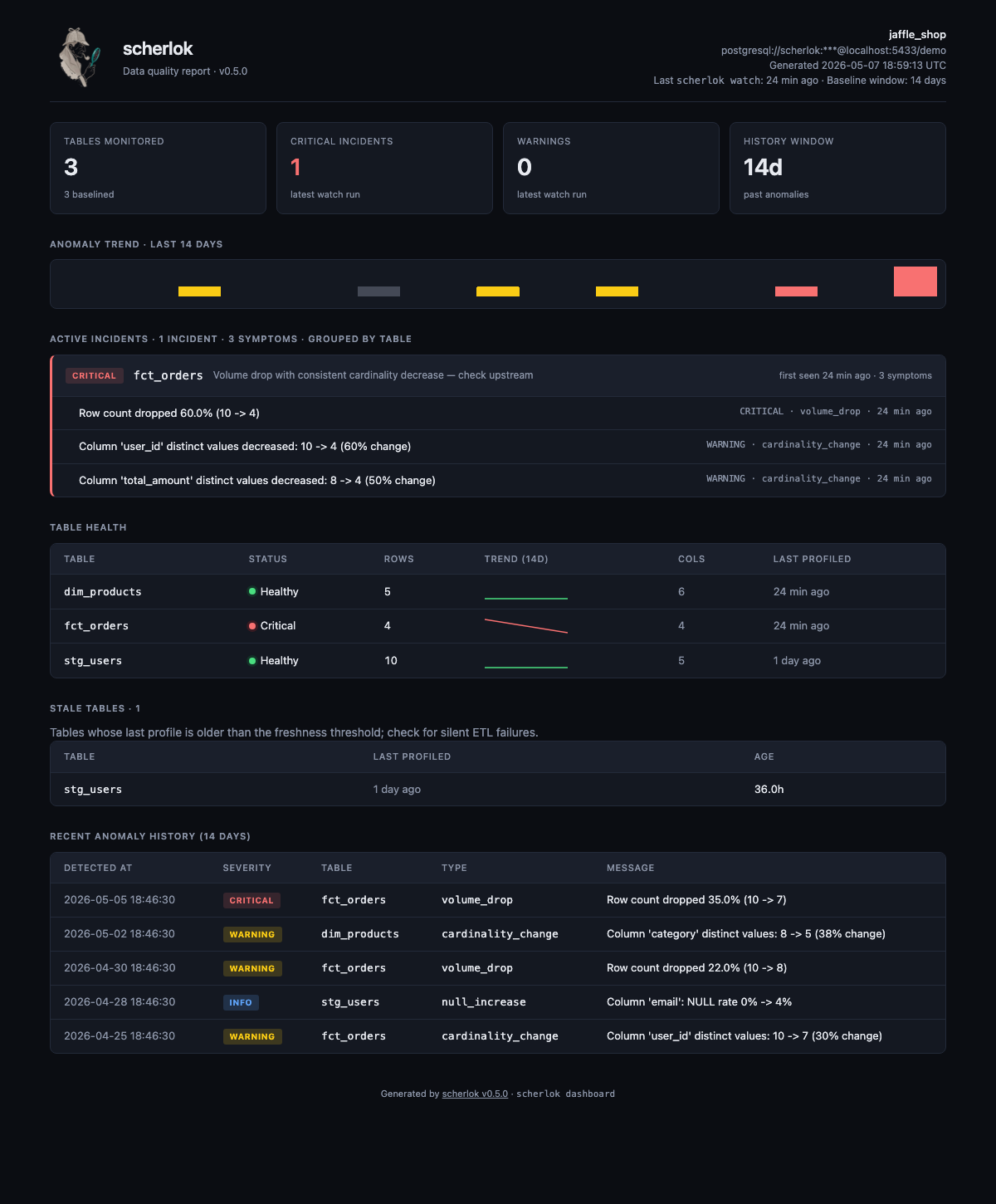
scherlok dashboard --out report.htmlOne self-contained HTML file (~28 KB): KPIs, per-table incidents grouped with first-seen timestamps, +/−/~ schema-drift diff, sparklines, and full anomaly history. Auto dark/light theme via prefers-color-scheme.
📖 Full docs: dashboard guide →
Use it from an AI agent (MCP)
Let Claude Code / Claude Desktop run data-quality checks directly:
pip install scherlok # scherlok-mcp ships built-in since v0.7.0{
"mcpServers": {
"scherlok": {
"command": "scherlok-mcp",
"env": { "SCHERLOK_CONNECTION": "postgresql://user:pass@host/db" }
}
}
}The agent gets list_tables, investigate, watch, status, history, and check as tools. Credentials are resolved server-side (never passed by the model), every operation is read-only on the warehouse, and there's no arbitrary-SQL tool.
📖 Full docs: MCP server guide →
AI-explained alerts (--explain)
Your alert says what broke. --explain adds why — and what to check next.
pip install 'scherlok[explain]'
export ANTHROPIC_API_KEY=sk-ant-...

scherlok watch --webhook https://hooks.slack.com/... --explainWhen anomalies fire, Scherlok makes one Claude call for the whole batch and injects a short root-cause hypothesis into the same Slack/Discord/Teams/email/JSON alert:
<div align="center"> <img src="examples/demo-explain.svg" alt="scherlok watch --explain: anomalies table followed by the AI hypothesis panel" width="760"> </div>Works on watch, ci, check, dbt, and dbt-run-and-watch. On dbt projects the hypothesis is lineage-aware: upstream parents from manifest.json go into the prompt, so cascading failures get traced to the source model instead of alerting on every downstream symptom.
- What it costs — one call per fired run (not per anomaly), Claude Haiku 4.5 by default: well under a cent per run (~$0.003). Override the model with
SCHERLOK_EXPLAIN_MODEL. Runs with zero anomalies make no API call. - What it sends — aggregates only: the anomaly type/severity/message strings already in your alert, dbt model names, detection timestamps. Never warehouse rows, cell values, or credentials — the test suite pins this as a contract.
- How to turn it off — it's opt-in; don't pass
--explain. If the API call fails (no key, timeout, rate limit), the original alert is delivered unchanged with a one-line note. Alerting never blocks on the LLM.
📖 Full docs: explainer guide →
How It Works
1. investigate — Learn the patterns
$ scherlok investigate

  Profiling 12 tables...
  ✓ users         — 45,231 rows, 8 columns
  ✓ orders        — 1,203,847 rows, 15 columns
  ✓ products      — 892 rows, 12 columns
  ...
Done. Profiles saved.Scherlok profiles every table: row counts, column types, NULL rates, value distributions, freshness cadence, cardinality. Stores everything locally in SQLite.
2. watch — Detect anomalies
$ scherlok watch

  Checking 12 tables against learned profiles...

  🔴 CRITICAL  orders    volume_drop     Row count dropped 52% (1,203,847 → 578,412)
  🟡 WARNING   users     null_increase   Column "email": NULL rate 2.1% → 18.7%
  🔵 INFO      products  distribution    Column "price": mean shifted 3.2σ

3 anomalies detected. Exit code: 13. Alert — Slack, CI/CD, or both
# Slack
scherlok watch --webhook https://hooks.slack.com/services/...

# Discord
scherlok watch --webhook https://discord.com/api/webhooks/...

# Microsoft Teams
scherlok watch --webhook https://outlook.office.com/webhook/...

# Any endpoint (generic JSON payload)
scherlok watch --webhook https://my-api.com/alerts

# CI/CD gate (fails pipeline on CRITICAL)
scherlok watch --exit-code --fail-on criticalAuto-detects Slack, Discord, and Teams from the URL and formats the payload accordingly. Any other URL receives a generic JSON payload.
CI/CD Integration
Use Scherlok as a data quality gate. The ci command does it in one line:
# GitHub Actions
- name: Data quality check
  run: |
    pip install scherlok
    scherlok config --store s3://my-bucket/scherlok/profiles.db
    scherlok ci ${{ secrets.DATABASE_URL }} \
      --webhook ${{ secrets.SLACK_WEBHOOK }} \
--fail-on criticalIf Scherlok detects a critical anomaly, the pipeline fails. Bad data never reaches production.
Email alerts
export SCHERLOK_SMTP_HOST=smtp.gmail.com
export SCHERLOK_SMTP_USER=alerts@company.com
export SCHERLOK_SMTP_PASSWORD=app-specific-password

scherlok watch --email team@company.com --email cto@company.comConnectors
# PostgreSQL
scherlok connect postgres://user:pass@host:5432/db

# BigQuery — see src/scherlok/connectors/bigquery.md for auth, billing, CI patterns
pip install scherlok[bigquery]
scherlok connect bigquery://project-id/dataset-name

# Snowflake
pip install scherlok[snowflake]
export SNOWFLAKE_USER=...
export SNOWFLAKE_PASSWORD=...
export SNOWFLAKE_WAREHOUSE=...
scherlok connect snowflake://account/database/schema

# MySQL
pip install scherlok[mysql]
scherlok connect mysql://user:pass@host:3306/dbname

# DuckDB
pip install scherlok[duckdb]
scherlok connect duckdb:///path/to/file.db| Database | Status |
|---|---|
| PostgreSQL | Available |
| BigQuery | Available |
| Snowflake | Available |
| MySQL | Available |
| DuckDB | Available |
Remote Storage
Share profiles across CI runs and team members:
# AWS S3
scherlok config --store s3://my-bucket/scherlok/profiles.db

# Google Cloud Storage
scherlok config --store gs://my-bucket/scherlok/profiles.db

# Azure Blob Storage
scherlok config --store az://my-container/scherlok/profiles.dbWhy Not [Other Tool]?
| Great Expectations | Soda | Monte Carlo | Scherlok | |
|---|---|---|---|---|
| Setup time | Hours | 30 min | Weeks | 5 minutes |
| Config required | Hundreds of rules | YAML checks | Dashboard setup | None |
| Anomaly detection | Manual thresholds | Paid feature | Yes |
…