MCP Server for Asana

This Model Context Protocol server implementation of Asana allows you to talk to Asana API from MCP Client such as Anthropic's Claude Desktop Application, and many more.
More details on MCP here:
- https://www.anthropic.com/news/model-context-protocol
- https://modelcontextprotocol.io/introduction
- https://github.com/modelcontextprotocol
<a href="https://glama.ai/mcp/servers/ln1qzdhwmc"><img width="380" height="200" src="https://glama.ai/mcp/servers/ln1qzdhwmc/badge" alt="mcp-server-asana MCP server" /></a>
Environment Variables
ASANA_ACCESS_TOKEN: (Required) Your Asana access tokenREAD_ONLY_MODE: (Optional) Set to 'true' to disable all write operations. In this mode:- Tools that modify Asana data (create, update, delete) will be disabled
- The
create-taskprompt will be disabled - Only read operations will be available This is useful for testing or when you want to ensure no changes can be made to your Asana workspace.
Usage
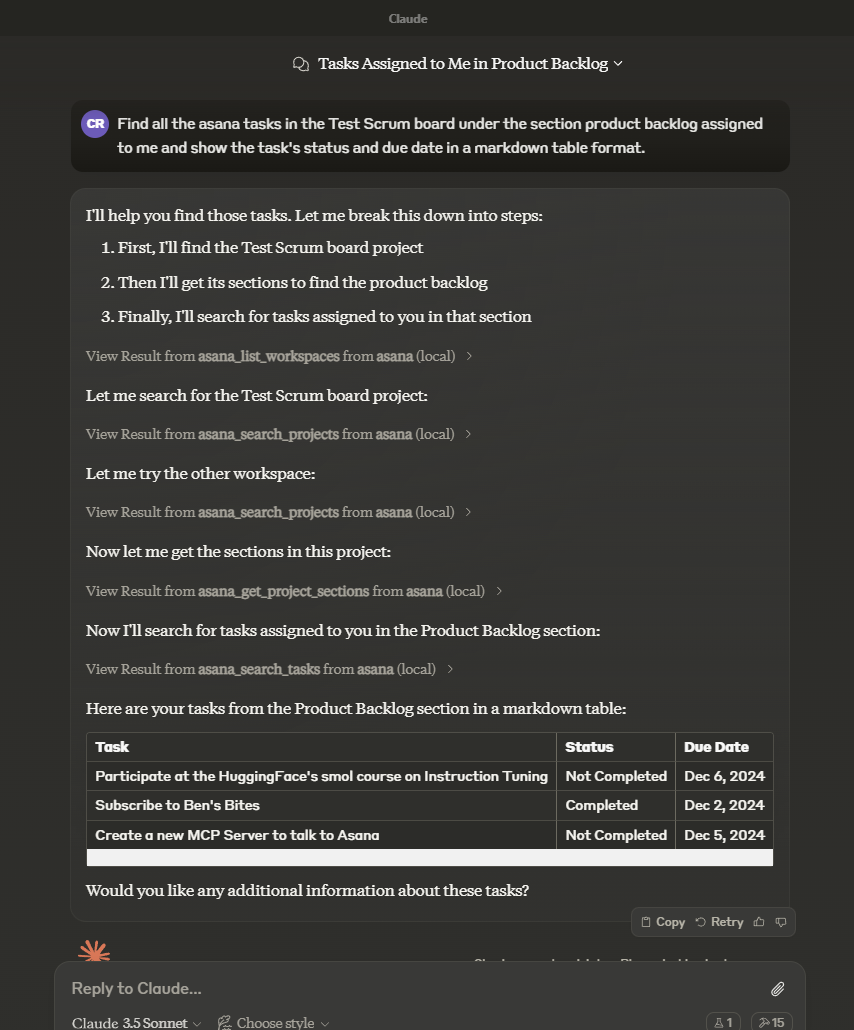
In the AI tool of your choice (ex: Claude Desktop) ask something about asana tasks, projects, workspaces, and/or comments. Mentioning the word "asana" will increase the chance of having the LLM pick the right tool.
Example:
How many unfinished asana tasks do we have in our Sprint 30 project?
Another example:
Tools
asana_list_workspaces- List all available workspaces in Asana
- Optional input:
- opt_fields (string): Comma-separated list of optional fields to include
- Returns: List of workspaces
asana_search_projects- Search for projects in Asana using name pattern matching
- Required input:
- workspace (string): The workspace to search in
- name_pattern (string): Regular expression pattern to match project names
- Optional input:
- archived (boolean): Only return archived projects (default: false)
- opt_fields (string): Comma-separated list of optional fields to include
- Returns: List of matching projects
asana_search_tasks- Search tasks in a workspace with advanced filtering options
- Required input:
- workspace (string): The workspace to search in
- Optional input:
- text (string): Text to search for in task names and descriptions
- resource_subtype (string): Filter by task subtype (e.g. milestone)
- completed (boolean): Filter for completed tasks
- is_subtask (boolean): Filter for subtasks
- has_attachment (boolean): Filter for tasks with attachments
- is_blocked (boolean): Filter for tasks with incomplete dependencies
- is_blocking (boolean): Filter for incomplete tasks with dependents
- assignee, projects, sections, tags, teams, and many other advanced filters
- sort_by (string): Sort by due_date, created_at, completed_at, likes, modified_at (default: modified_at)
- sort_ascending (boolean): Sort in ascending order (default: false)
- opt_fields (string): Comma-separated list of optional fields to include
- custom_fields (object): Object containing custom field filters
- Returns: List of matching tasks
asana_get_task- Get detailed information about a specific task
- Required input:
- task_id (string): The task ID to retrieve
- Optional input:
- opt_fields (string): Comma-separated list of optional fields to include
- Returns: Detailed task information
asana_create_task- Create a new task in a project
- Required input:
- project_id (string): The project to create the task in
- name (string): Name of the task
- Optional input:
- notes (string): Description of the task
- html_notes (string): HTML-like formatted description of the task
- due_on (string): Due date in YYYY-MM-DD format
- assignee (string): Assignee (can be 'me' or a user ID)
- followers (array of strings): Array of user IDs to add as followers
- parent (string): The parent task ID to set this task under
- projects (array of strings): Array of project IDs to add this task to
- resource_subtype (string): The type of the task (default_task or milestone)
- custom_fields (object): Object mapping custom field GID strings to their values
- Returns: Created task information
asana_get_task_stories- Get comments and stories for a specific task
- Required input:
- task_id (string): The task ID to get stories for
- Optional input:
- opt_fields (string): Comma-separated list of optional fields to include
- Returns: List of task stories/comments
asana_update_task- Update an existing task's details
- Required input:
- task_id (string): The task ID to update
- Optional input:
- name (string): New name for the task
- notes (string): New description for the task
- html_notes (string): HTML-like formatted description of the task (subset of HTML tags supported)
- due_on (string): New due date in YYYY-MM-DD format
- assignee (string): New assignee (can be 'me' or a user ID)
- followers (array): Array of user IDs to add as followers
- parent (string): The parent task ID to move this task under
- completed (boolean): Mark task as completed or not
- resource_subtype (string): The type of the task (default_task or milestone)
- custom_fields (object): Object mapping custom field GID strings to their values
- Returns: Updated task information
asana_get_project- Get detailed information about a specific project
- Required input:
- project_id (string): The project ID to retrieve
- Optional input:
- opt_fields (string): Comma-separated list of optional fields to include
- Returns: Detailed project information
asana_get_project_task_counts- Get the number of tasks in a project
- Required input:
- project_id (string): The project ID to get task counts for
- Optional input:
- opt_fields (string): Comma-separated list of optional fields to include
- Returns: Task count information
asana_get_project_sections- Get sections in a project
- Required input:
- project_id (string): The project ID to get sections for
- Optional input:
- opt_fields (string): Comma-separated list of optional fields to include
- Returns: List of project sections
asana_create_task_story- Create a comment or story on a task
- Required input:
- task_id (string): The task ID to add the story to
- text (string): The text content of the story/comment
- Optional input:
- opt_fields (string): Comma-separated list of optional fields to include
- Returns: Created story information
asana_add_task_dependencies- Set dependencies for a task
- Required input:
- task_id (string): The task ID to add dependencies to
- dependencies (array of strings): Array of task IDs that this task depends on
- Returns: Updated task dependencies
asana_add_task_dependents- Set dependents for a task (tasks that depend on this task)
- Required input:
- task_id (string): The task ID to add dependents to
- dependents (array of strings): Array of task IDs that depend on this task
- Returns: Updated task dependents
asana_create_subtask- Create a new subtask for an existing task
- Required input:
- parent_task_id (string): The parent task ID to create the subtask under
- name (string): Name of the subtask
- Optional input:
- notes (string): Description of the subtask
- due_on (string): Due date in YYYY-MM-DD format
- assignee (string): Assignee (can be 'me' or a user ID)
- opt_fields (string): Comma-separated list of optional fields to include
- Returns: Created subtask information
asana_get_multiple_tasks_by_gid- Get detailed information about multiple tasks by their GIDs (maximum 25 tasks)
- Required input:
- task_ids (array of strings or comma-separated string): Task GIDs to retrieve (max 25)
- Optional input:
- opt_fields (string): Comma-separated list of optional fields to include
- Returns: List of detailed task information
asana_get_project_status- Get a project status update
- Required input:
- project_status_gid (string): The project status GID to retrieve
- Optional input:
- opt_fields (string): Comma-separated list of optional fields to include
- Returns: Project status information
asana_get_project_statuses- Get all status updates for a project
- Required input:
- project_gid (string): The project GID to get statuses for
- Optional input:
- limit (number): Results per page (1-100)
- offset (string): Pagination offset token
- opt_fields (string): Comma-separated list of optional fields to include
- Returns: List of project status updates
asana_create_project_status- Create a new status update for a project
- Required input:
- project_gid (string): The project GID to create the status for
- text (string): The text content of the status update
- Optional input:
- color (string): The color of the status (green, yellow, red)
- title (string): The title of the status update
- html_text (string): HTML formatted text for the status update
- opt_fields (string): Comma-separated list of optional fields to include
- Returns: Created project status information
asana_delete_project_status- Delete a project status update
- Required input:
- project_status_gid (string): The project status GID to delete
- Returns: Deletion confirmation
asana_set_parent_for_task- Set the parent of a task and position the subtask within the other subtasks of that parent
- Required input:
- task_id (string): The task ID to operate on
- data (object):
- parent (string): The new parent of the task, or null for no parent
- Optional input:
- insert_after (string): A subtask of the parent to insert the task after, or null to insert at the beginning of the list
- insert_before (string): A subtask of the parent to insert the task before, or null to insert at the end of the list
- opt_fields (string): Comma-separated list of optional fields to include
- Returns: Updated task information
asana_get_tag- Get detailed information about a specific tag
- Required input:
- tag_gid (string): Globally unique identifier for the tag
- Optional input:
- opt_fields (string): Comma-separated list of optional fields to include
- Returns: Detailed tag information
asana_get_tags_for_task- Get a task's tags
- Required input:
- task_gid (string): The task to operate on
- Optional input:
- limit (number): Results per page. The number of objects to return per page. The value must be between 1 and 100.
- offset (string): Offset token. An offset to the next page returned by the API.
- opt_fields (string): Comma-separated list of optional fields to include
- Returns: List of tags associated with the task
asana_get_tasks_for_tag- Get tasks for a specific tag
- Required input:
- tag_gid (string): The tag GID to retrieve tasks for
- Optional input:
- opt_fields (string): Comma-separated list of optional fields to include
- opt_pretty (boolean): Provides the response in a 'pretty' format
…