Longhand





Persistent local memory for Claude Code. Every tool call, every file edit, every thinking block from every Claude Code session — stored verbatim on your machine. Searchable, replayable, and recallable by fuzzy natural-language questions. Zero API calls. Zero summaries. Zero decisions made by an AI about what's worth remembering.
Claude Code quietly rotates your session files after a few weeks. Longhand captures them into SQLite before they're gone. Once ingested, your history stays forever — even after the source JSONL files are deleted. Install early; the past you don't capture is unrecoverable.
If you have 20+ Claude Code sessions in
~/.claude/projects/, Longhand can search across every fix, decision, and conversation you've had in ~56ms — without a single API call.
Does it use a lot of tokens? No — every tool is capped by design. A full
recallacross 100+ sessions returns ~4K tokens. Reading one raw session JSONL costs 10–50× more. See Token budget.
pip install longhand
longhand setup        # ingest history + install hooks + configure MCP
longhand recall "that stripe webhook bug from last week"Want to kick the tires first? Run longhand demo for a 60-second walkthrough on a fake 3-session sample corpus — your real ~/.claude and ~/.longhand are not touched. The demo seeds a sandboxed store with a Stripe-webhook bug + Supabase auth migration + downstream 401 fix, then runs cross-session recall and project-status so you can see what the output looks like before committing.
pip install longhand
longhand demo # sandboxed; cleans up afterwards (pass --keep to explore)Upgrading to 1.0.0? This is the release that closes the deprecation window 0.13 opened. Everything removed here has been warning since 0.13.0:
- Four CLI aliases are gone:
patterns→recall "<topic>",recap→status --days N,continue→status --session <prefix>,reanalyze→analyze --all. - The
reconcileMCP tool now defaults to a dry run. If you have an agent loop that relied on the implicit heal, passfix=trueexplicitly. Dry runs tell you so in the payload. - Six retired MCP tools left the listing (19 → 13) but still answer forever with a migration note — retired names live in users' own
CLAUDE.mdfiles and must never hard-fail. - New: COMPATIBILITY.md states what 1.x guarantees and what it doesn't.
Your database needs nothing. Migrations are automatic and a 0.11+ store opens on any later 1.x — that's Promise 2, and there's a real 0.11-schema fixture in the test suite proving it.
Upgrading to 0.13.0? Nothing breaks — that release opened the v1.0 deprecation window, so every old name kept working while pointing at its replacement:
statusis now the single resume command: barestatus= recent digest (wasrecap),status <project>unchanged,status --session <prefix>= session tail (wascontinue). The old commands still run and print a pointer; they're removed at v1.0.- Six MCP tools folded into six survivors with identical parameters (
search_in_context→search+context_events,get_episode→find_episodes+episode_id, etc. — full table in the CHANGELOG). The retired names still answer, prefixed with a migration note. - Hooks can no longer exit nonzero — failures become breadcrumbs in
~/.longhand/logs/and two newdoctorrows (Hook errors,Transcript format) keep them visible. - "Today"/"yesterday" recall windows now follow your local calendar day instead of UTC's; rankings may shift once if you're not in UTC.
- Windows users: this release fixes a serious bug where the ingest-lock liveness check could terminate other longhand processes.
- New:
LONGHAND_DATA_DIRrelocates the store for the CLI, hooks, and MCP server in one move;status --json/doctor --jsonfor scripting.
Upgrading to 0.9.0? Live ingestion captures sessions in flight, plan history is preserved as first-class data, and an optional reconciler job keeps the index honest in the background:
- New
longhand ingest-livecommand runs from Claude Code'sStophook to tail the active transcript between assistant turns. Sessions show up inrecallwhile you're still working, not after they end. - New
longhand plans listcommand andlist_plansMCP tool surface every Write/Edit to~/.claude/plans/*.mdacross your entire history. Plans are now extracted as their own entity alongside episodes. - New
longhand schedule install-reconcilerinstalls an optional launchd job that runsreconcile --fixperiodically — catches anything the live and post-session hooks missed without you ever thinking about it. - The Stop hook coexists with the existing SessionEnd hook: live tails the transcript as it grows; SessionEnd does the full analysis pass when the session closes.
Upgrading to 0.8.1? Staleness signals now propagate everywhere they belong, and reconcile is an MCP tool — Claude can self-heal the index from inside a session:
searchandlist_sessionsnow wrap the response withstale: true+stale_reasonwhen the project they're scoped to has on-disk transcripts not yet ingested. Pre-v0.8.1 these returned clean-looking empty results (same silent-failure shaperecall_project_statuswas built to catch — just one layer up).- New
reconcileMCP tool wrapslonghand reconcile --fix. After a staleness banner fires, Claude callsreconciledirectly instead of asking the user to run a CLI command. list_sessionsdefaultlimitraised from 20 to 50 — active days routinely cross 5+ projects across 5+ sessions; the old default truncated reviews silently.
Upgrading from 0.7.x or earlier? Cleaner recall narratives, plus a real bug-finding test layer underneath (from 0.8.0):
- Pre-v0.8
_compose_fix_summaryprepended a literal"Intent:"label to half of all extracted episodes (49% of the reference corpus). The label leaked into every recall narrative for those episodes. Migration v4 strips it from existing rows on first store open — no command needed. - Diff content in
fix_summarynow truncates at whitespace boundaries with a visible…, instead of landing mid-token (phoneNum',family?:',strin'). Forward-only. - Narrative footer "Other matches" lines now include the session id so you can drill in.
- New canary harness (
tests/fixtures/corpus/) anchors regression tests to real shipped bugs. New recall validator (scripts/recall_diff.py) snapshots and diffs ranking results against your live corpus — catches regressions pytest can't see.
pip install --upgrade longhand
longhand recall "..." # migration runs transparently on first openIf you're also coming from 0.5.x, run longhand reconcile --fix once to re-attribute multi-project sessions per the v0.6 inference improvements (cd-into-project sessions now attribute to the project where most work happened, not the first-event cwd). If you're on 0.5.8 or earlier, chain them: longhand reconcile --fix && longhand analyze --all. Both are idempotent.
Large history? (>1 GB of ~/.claude/projects) Expect the first-time backfill to take 10–30 minutes on an M-class Mac — most of that wall time is the embedding model running on all your cores (which is why you'll see triple-digit CPU%; that's ONNX doing its job, not a hang). To get a working store faster, use the fast-path:
longhand setup --skip-analysis   # SQLite only; works in ~1 min for multi-GB corpora
longhand analyze --all # fill in episodes + vectors whenever, safe to backgroundExact-text search, timelines, file history, and commit lookup all work after --skip-analysis. Semantic recall needs the analyze --all pass to complete. Typical throughput on an M-class Mac is ~1–2 sessions/sec for full analysis.
Status: v1.0.1 — stable, daily-driver tested, security-audited (zero critical findings), on PyPI, available as a Claude Code plugin. Validated against 433 real Claude Code sessions across 37 inferred projects (measured 2026-08-12). 546 unit tests passing.
Full docs: Longhand Wiki — getting started, CLI reference, MCP tools reference, architecture, and troubleshooting.
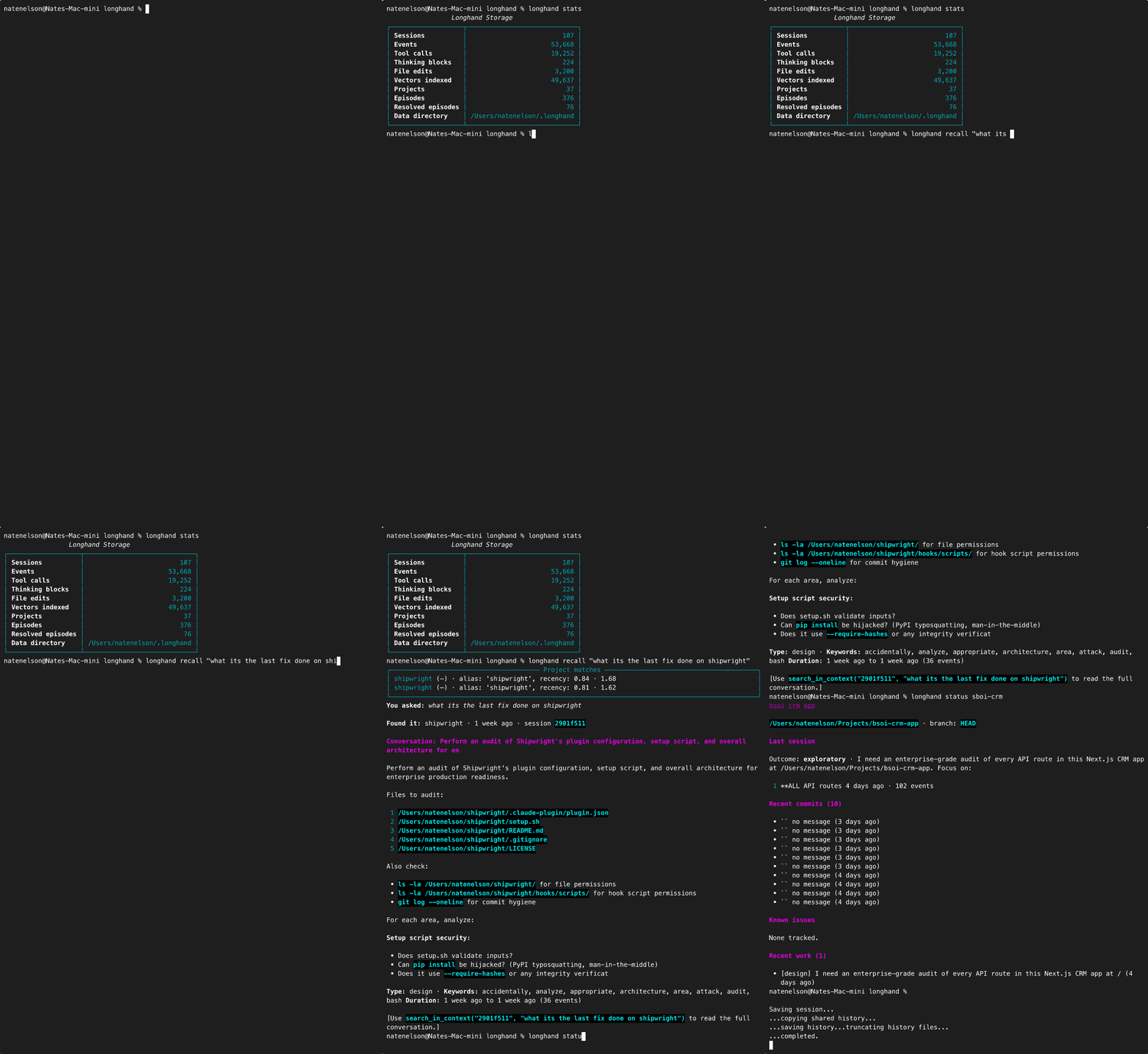
The Inversion
Everyone is solving AI memory by making the context window bigger. 1M tokens. 2M tokens. Context-infinite. The whole industry is racing in the same direction: make the model carry more state.
Longhand goes the other direction. The model doesn't need to carry the memory. The disk does.
| Bigger context windows | Longhand | |
|---|---|---|
| Where it lives | Rented from a model provider | A SQLite file + ChromaDB on your laptop |
| Cost per query | Tokens × dollars | Zero |
| Privacy | Goes through someone else's servers | Never leaves your machine |
| Speed | Seconds to minutes for large contexts | ~56ms search · ~1.4s full recall |
| Loss | Attention degrades in the middle of long contexts | Every event from the source file, nothing dropped |
| Persistence | Dies when the window closes | Lives until you delete the file |
| Across model versions | Doesn't transfer | Same data, any model |
| Offline | No | Yes |
| Scales with | Provider's pricing | Your hard drive |
The "memory crisis" in AI was an artificial constraint. Storage is solved. SQLite is from 2000. ChromaDB is two years old. Both run on a laptop. Longhand bypasses the crisis by ignoring it — your past sessions are already on disk, written by Claude Code itself, in JSONL files that contain every single event verbatim. Longhand reads those files, indexes them locally, and gives you semantic recall over your entire history without ever sending a token through someone else's API.
Local. Complete. Yours.
Storage footprint: ~5GB for a heavy power user (430+ sessions, 195k+ events, months of daily Opus usage across 37 inferred projects). Typical users: 200–400MB. Once Claude Code rotates the source files off disk, Longhand isn't a duplicate — it's the only copy.
Platform support
Python 3.10 – 3.14 are all fully supported and gated in CI — every release must pass the full suite on all five before it can merge.
Longhand pins chromadb<1.0 for every Python version, not just 3.14. The pin originated with chromadb's newer Rust bindings segfaulting on 3.14 (#4, now closed), and it stays until a 1.x chromadb is verified across the whole matrix.
Windows: CI-tested, best-effort. A windows-latest × py3.12 leg runs on every PR and has gone green on every run since v0.13.0, but it is non-blocking and covers one Python version o
…